Get Raytheon Cr-003 2010-2026
How it works
-

Open form follow the instructions
-

Easily sign the form with your finger
-

Send filled & signed form or save
How to fill out the Raytheon CR-003 online
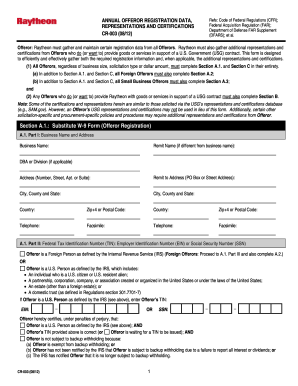
The Raytheon CR-003 form is an essential document for Offerors seeking to register and certify information for contracts related to U.S. Government work. This guide will provide clear, step-by-step instructions for successfully completing the form online, making the process straightforward and efficient for all users.
Follow the steps to complete the Raytheon CR-003 online form effectively.
- Press the ‘Get Form’ button to access the form and open it in the designated online editor.
- Complete Section A.1, which requires business name and address details. Provide any applicable information for remit names, business divisions, and addresses clearly.
- In Part II of Section A.1, indicate your Federal Tax Identification Number (TIN) as either an Employer Identification Number (EIN) or Social Security Number (SSN). Determine if you qualify as a U.S. Person or a Foreign Person and fill out the appropriate information.
- Fill out Part III of Section A.1, providing your Data Universal Numbering System (DUNS) Number and Physical Business Location details. Include your CAGE or NCAGE Code if applicable.
- If applicable, proceed to Section A.2 for Foreign Offerors, answering whether you derive any U.S.-source income and completing the required questions.
- For Small Business Offerors, complete Section A.3 by confirming your business size and any additional representations required for small businesses.
- Fill out Section B, where additional representations and certifications required for work under U.S. Government contracts must be completed, including certifications regarding responsibility matters.
- In Section C, provide the authorized signature of the Offeror or their representative, confirming the accuracy of the information provided.
- Finally, review all sections for completeness and accuracy before saving your changes. Once completed, you can download, print, or share the form as needed.
Complete your Raytheon CR-003 form online today to ensure compliance and streamline your registration process.
Raytheon Technologies has found itself at the center of controversy due to its dual role in advanced defense systems and civilian aerospace. The debate often focuses on the implications of its technologies on both military operations and civilian safety. As discussions regarding Raytheon CR-003 evolve, many seek clarity on how the company aligns its technological advancements with ethical accountability.