Loading
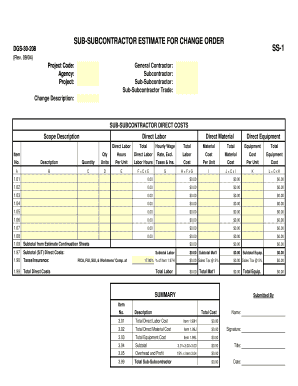
Get Change Order Estimate - Form Ss-1, Sub-subcontractor.xlsx
How it works
-

Open form follow the instructions
-

Easily sign the form with your finger
-

Send filled & signed form or save
How to fill out the Change Order Estimate - Form SS-1, Sub-Subcontractor.xlsx online
Filling out the Change Order Estimate - Form SS-1, Sub-Subcontractor.xlsx is a crucial step in financial management for subcontracting projects. This guide will walk you through each section and field of the form, ensuring you can complete it accurately and online with confidence.
Follow the steps to effectively complete your change order estimate online.
- Click the ‘Get Form’ button to obtain the form and open it in your preferred online editor.
- Begin by entering the project code, agency, and project name at the top of the form. This information is essential for properly identifying the order.
- Fill in the general contractor, subcontractor, and sub-subcontractor details. Ensure that all names are accurate and complete.
- Provide a clear and concise description of the change in the 'Change Description' section. This should summarize what the change order entails.
- In the section for 'Sub-Subcontractor Direct Costs,' list the scope description and item numbers. Specify each item's description with clarity.
- For each item, input the direct labor, material, and equipment costs. Be sure to calculate the total for each category by entering hours, quantities, and costs per unit where required.
- Calculate subtotals for labor, materials, and equipment. These will be essential for later summaries and totals.
- Complete the tax and insurance calculations as instructed on the form, making sure to apply the correct rates.
- Summarize all direct costs, ensuring that totals for labor, materials, and equipment are accurately captured.
- Finally, review the entire form for accuracy before you save changes. You can also download, print, or share the completed form as needed.
Start filling out your change order estimate online today for a streamlined process.