Loading
Get Irs 6252 2016
This website is not affiliated with IRS
How it works
-

Open form follow the instructions
-

Easily sign the form with your finger
-

Send filled & signed form or save
How to fill out the IRS 6252 online
Filling out Form 6252 is essential for reporting income from installment sales. This guide provides a clear, step-by-step approach to help users navigate the online form effectively.
Follow the steps to fill out Form 6252 accurately.
- Click ‘Get Form’ button to obtain the form and open it in the editor.
- Enter the name(s) shown on your return in the designated field at the top of the form.
- Input your identifying number, typically your Social Security number or Employer Identification Number, in the appropriate section.
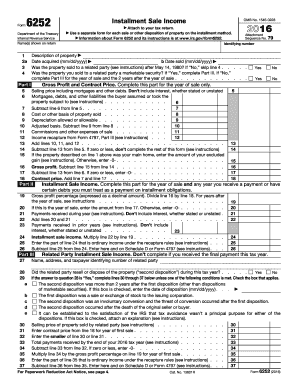
- Complete lines 1 through 4 in Part I regarding the description of the property, acquisition date, sale date, and any related party status.
- For line 5, enter the total selling price that includes any debts the buyer assumed. Ensure you subtract any related interest components.
- Fill in line 6 with the mortgages or debts the buyer took on, excluding any new mortgages they may have secured.
- On line 7, provide the cost or other basis of the property sold, making sure to include any improvements made.
- Complete line 8 with the total depreciation that was allowed or allowable up to the date of sale.
- Calculate the adjusted basis on line 9 by subtracting any depreciation from the cost basis entered on line 7.
- Input selling expenses on line 10, which may encompass commissions, legal fees, and advertising costs.
- For any income recapture, report the corresponding figure on line 11 as directed by the instructions.
- Add the totals from lines 10, 11, and 12 and enter that sum on line 12.
- Continuing to line 14, subtract the total deductions from the selling price on line 5, making sure if the result is zero or less, to stop completing this form.
- If applicable, identify any gain exclusions on line 15, which relates to the sale of your main home.
- Proceed to Part II and determine the gross profit percentage for the year of sale on line 19.
- Complete lines 20 through 25 in Part II by entering the payments received during the year, prior years, and any associated details regarding installment sale income.
- If you sold to a related party, make sure to complete Part III as well, following the specific conditions for line submissions.
- When completed, save your changes, download a copy for your records, and consider printing or sharing the form as needed.
Complete your tax documentation efficiently by filing Form 6252 online.
Get form
Experience a faster way to fill out and sign forms on the web. Access the most extensive library of templates available.
The installment sale treatment is not mandatory, but it can provide tax benefits. You can choose this method for reporting if you prefer to spread your tax liability over several years. Utilizing IRS form 6252 will guide you through the reporting process effectively. For any specific concerns or tailored advice, consider reaching out to resources like US Legal Forms.
Get This Form Now!
Use professional pre-built templates to fill in and sign documents online faster. Get access to thousands of forms.