Loading
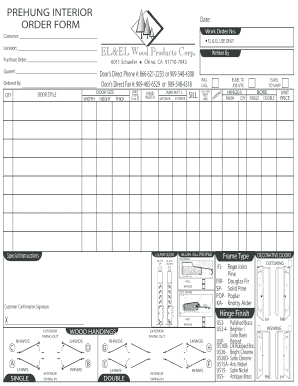
Get El&el Wood Products Corp Prehung Interior Order Form
How it works
-

Open form follow the instructions
-

Easily sign the form with your finger
-

Send filled & signed form or save
How to fill out the EL&EL Wood Products Corp Prehung Interior Order Form online
Filling out the EL&EL Wood Products Corp Prehung Interior Order Form online is a straightforward process that can greatly enhance your ordering experience. This guide provides clear, step-by-step instructions to ensure you complete the form accurately and efficiently.
Follow the steps to complete your online order form successfully.
- Click ‘Get Form’ button to obtain the form and open it in the editor.
- Begin by entering the 'Date' and 'Work Order No.' at the top of the form to establish your order's timeline.
- Fill out the 'Customer' section with your name or the name of your business.
- In the 'Location' field, provide the address where the product will be delivered.
- Complete the 'Purchase Order' and 'Quote#' sections to reference any related documentation.
- Enter your contact information, including 'Door’s Direct Phone #' and 'Door’s Direct Fax #', to facilitate communication.
- Specify the 'Ordered By' for record-keeping purposes.
- Provide the dimensions of the door under 'DOOR SIZE', filling in 'WIDTH', 'HEIGHT', and 'THICK' as applicable.
- Select the 'DOOR STYLE' and quantity ('QTY') of doors you want to order.
- Identify the 'JAMB WIDTH' and 'JAMB MAT’L' indicating the material type required for the jamb.
- Specify special instructions in the 'Special Instructions' box, if any, for customization or specific requests.
- For 'LOUVER DOORS', indicate the number of slats up and down as required.
- Select the appropriate finish for 'Hinge Finish' to specify how you want the hinges to look.
- Choose the desired frame type and sill profile under 'Frame Type' and 'ALUM. SILL PROFILE'.
- Confirm the total unit price and fill out the 'UNIT PRICE' area before final submission.
- Finally, review all entries for accuracy, and either 'Print', 'Save As', or 'Reset' the form before submission.
Start filling out your form online today to streamline your order process!
However, it is said in Genesis 14:18–20 that Abraham accepted the blessing of El, when Melchizedek, the king of Salem and high priest of its deity El Elyon blessed him.