Loading
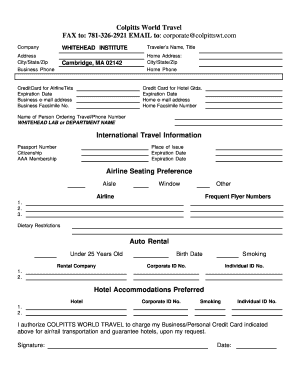
Get Colpitts World Travel Traveler Profile Form
How it works
-

Open form follow the instructions
-

Easily sign the form with your finger
-

Send filled & signed form or save
How to fill out the Colpitts World Travel Traveler Profile Form online
Completing the Colpitts World Travel Traveler Profile Form online can streamline your travel arrangements and ensure all necessary information is accurately submitted. This guide provides comprehensive, step-by-step instructions to help you navigate each section of the form with confidence.
Follow the steps to accurately fill out your traveler profile form.
- Press the ‘Get Form’ button to access the Traveler Profile Form online and open it in your preferred editor.
- Begin with the company section, providing the name and address of the organization, including city, state, and zip code. Enter the business phone number as well.
- Fill in the traveler’s name and title. Add the home address, including city, state, and zip code, followed by the home phone number.
- Enter credit card information for airline tickets, including the expiration date. Ensure you also include the business email address and business facsimile number.
- Complete the hotel credit card information and expiration date, along with the home email address and home facsimile number.
- Provide the name of the person ordering travel, along with their phone number and the name of the lab or department.
- Input international travel information such as the passport number, citizenship, and AAA membership details. Include the place of issue and the passport expiration date.
- Indicate your airline seating preference by selecting aisle, window, or other options. Provide the airline and frequent flyer numbers if applicable.
- List any dietary restrictions as needed, and indicate if you require auto rental services along with your age if under 25 years old and the preferred rental company.
- Enter your date of birth and smoking preference. Complete any corporate or individual ID numbers if applicable.
- For hotel accommodations, provide the preferred hotel name, corporate ID number, and any smoking preferences along with individual ID numbers.
- Authorize Colpitts World Travel to charge your business or personal credit card for air/rail transportation and hotel guarantees. Remember to include your signature and the date.
- After reviewing all the information for accuracy, save your changes, then download, print, or share the completed form as needed.
Complete your Colpitts World Travel Traveler Profile Form online today for a seamless travel experience.
To fill out a travel request form effectively, start with your personal and trip details. Include information such as the reason for travel, dates, and transportation needs. The Colpitts World Travel Traveler Profile Form acts as a helpful resource to ensure you include all relevant data, improving your chances of a smooth approval process.
Industry-leading security and compliance
US Legal Forms protects your data by complying with industry-specific security standards.
-
In businnes since 199725+ years providing professional legal documents.
-
Accredited businessGuarantees that a business meets BBB accreditation standards in the US and Canada.
-
Secured by BraintreeValidated Level 1 PCI DSS compliant payment gateway that accepts most major credit and debit card brands from across the globe.