Loading
Get Form Dsde39
How it works
-

Open form follow the instructions
-

Easily sign the form with your finger
-

Send filled & signed form or save
How to fill out the Form Dsde39 online
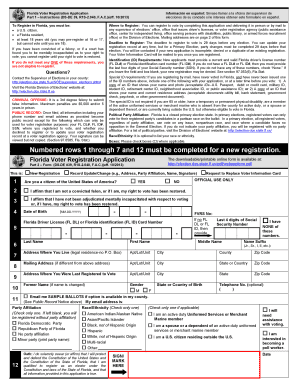
Filling out the Form Dsde39 online is an essential step for anyone wishing to register to vote in Florida. This guide provides clear, step-by-step instructions to ensure users can easily complete the form and submit it correctly.
Follow the steps to successfully complete the Form Dsde39 online.
- Click ‘Get Form’ button to obtain the form and open it in the editor.
- Begin with checking the purpose of your application by selecting one of the options: ‘New Registration’, ‘Record Update/Change’, or ‘Request to Replace Voter Information Card’. This selection will direct your submission process appropriately.
- Affirm your citizenship status by selecting 'Yes' or 'No' in the designated field. Ensure that you meet the eligibility requirements as a U.S. citizen, resident of Florida, and at least 18 years of age on or before the next election.
- Indicate your date of birth by filling in the required date format MM-DD-YYYY to verify your age.
- Input your Florida driver license (FL DL) or Florida identification (FL ID) card number. If you do not possess either, provide the last four digits of your Social Security number.
- Complete your personal information, including your first name, middle name, last name, name suffix (if applicable), and current residential address (no P.O. Box).
- If your mailing address differs from your residential address, fill in the corresponding fields for your mailing address including city, state, and zip code.
- Fill in the address where you were last registered to vote if applicable, including city, state, and zip code.
- Choose your political party affiliation by selecting one option. If left blank, you will be registered without party affiliation.
- Optionally, indicate your race or ethnicity by checking one applicable box. However, this step is not mandatory.
- Lastly, read and affirm the oath statement regarding the truth of the information provided, and sign or mark in the designated area. This confirms that all your information is accurate.
- Review all information entered for accuracy. Once complete, you can proceed to save changes, download, print, or share the completed form as required.
Complete your Form Dsde39 online today to ensure your voter registration is processed timely.