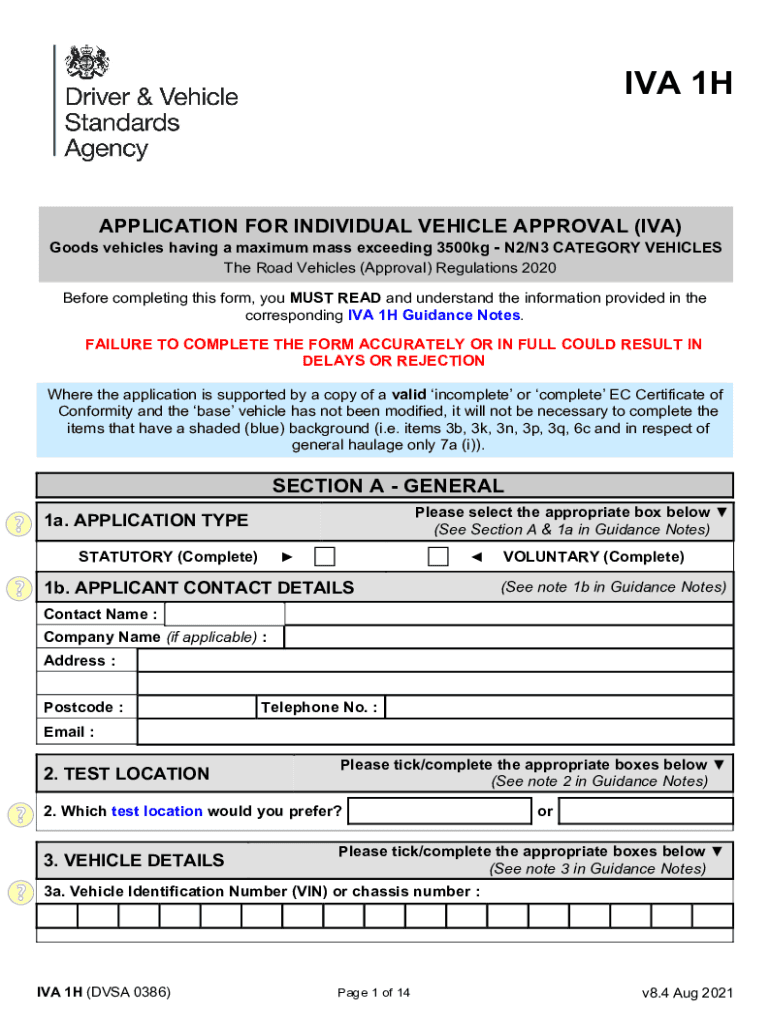
IVA 1HAPPLICATION FOR INDIVIDUAL VEHICLE APPROVAL (IVA)Goods vehicles having a maximum mass exceeding 3500kg N2/N3 CATEGORY VEHICLES The Road Vehicles (Approval) Regulations 2020 Before completing.
Loading

Open form follow the instructions

Easily sign the form with your finger

Send filled & signed form or save
How to fill out the UK IVA 1H online
Filling out the UK IVA 1H form online can seem challenging, but with the right guidance, the process can be straightforward and manageable. This guide will walk you through each section of the form, ensuring that you provide accurate and complete information for a successful application.
Follow the steps to complete your IVA 1H application online.
- Click ‘Get Form’ button to obtain the form and open it in the editor.
- Begin with Section A - General. Choose the application type by selecting the appropriate box, either 'Statutory' or 'Voluntary'. Fill in your contact details, including the contact name, company name (if applicable), address, postcode, telephone number, and email.
- Proceed to select your preferred test location in Section 2 by ticking the appropriate box.
- In Section 3 - Vehicle Details, provide the Vehicle Identification Number (VIN) or chassis number. Complete additional fields about the vehicle such as the position of the VIN, vehicle category, make and model, date of manufacture, and other specifications.
- Next, move to Section B - Approval. Answer the compliance questions related to the vehicle's registration and suitability for left-hand traffic, as well as any information regarding special purpose vehicles.
- Continue to Section 5 - Brakes, Tyres and Suspension. Fill out the type of brake system, ‘split’ arrangement of the service brake system, and provide details about the axles and tyre specifications.
- In Section 6, record the vehicle dimensions, including overall length, width, and distances between axles as required.
- Complete Section 7, which covers weights. Provide the original maximum design weight and confirm if you require a lower gross vehicle weight.
- Review Section C - Examination Requirements, confirming if you accept the remote assessment process if offered.
- Complete Section D - Data Protection, Declaration, and Signature. Ensure all declaration sections are filled out accurately. A typed signature is acceptable for electronic submissions.
- Finally, in Section E - Payment Details, indicate your preferred payment method, sign where indicated, and include any necessary details regarding pre-funded accounts or card payments.
- Once all sections are completed, you can save changes, download, print, or share the form as needed.
Take the first step towards your Individual Vehicle Approval application by completing the UK IVA 1H online today.
Experience a faster way to fill out and sign forms on the web. Access the most extensive library of templates available.
Related content
by M Thomas · 2021 — First, 5-bromo-1H-pyrrolo[2,3-b]pyridine was methylated on the...
The exercise of sovereignty by the British Crown—in 19th and 20th century ... Among...
Ivabradine, sold under the brand name Procoralan among others, is a medication used for...
Use professional pre-built templates to fill in and sign documents online faster. Get access to thousands of forms.
If you believe that this page should be taken down, please follow our DMCA take down process here.
This form is available in several versions. Select the version you need from the drop-down list below.