Loading
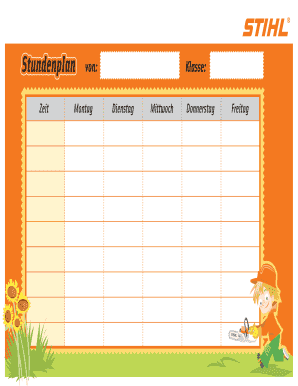
Get Dein Stihl Stundenplan Zum
How it works
-

Open form follow the instructions
-

Easily sign the form with your finger
-

Send filled & signed form or save
How to use or fill out the Dein STIHL Stundenplan Zum online
Filling out the Dein STIHL Stundenplan Zum online is a straightforward process that allows users to effectively manage their scheduling needs. This guide provides a detailed walkthrough of each section of the form to ensure accurate and efficient completion.
Follow the steps to fill out the form correctly.
- Click ‘Get Form’ button to acquire the form and open it in your preferred editor.
- Start with the 'Zeit' section where you will input the time schedules for each day of the week. Make sure to specify the exact times for each class or activity you have planned.
- Fill in the 'Montag' section with the classes or activities scheduled for Monday. Be clear and concise about the titles and timings.
- Proceed to the 'Dienstag' section and enter the relevant information for Tuesday. Ensure consistency in formatting as you enter the data.
- Continue to the 'Mittwoch' section and input your Wednesday schedule, following the previous steps for clarity.
- Fill in the 'Donnerstag' section with your planned activities for Thursday, keeping the layout uniform.
- Finally, complete the 'Freitag' section with the details for Friday, ensuring all information is accurate and correctly formatted.
- Once all sections are complete, review your form for any errors, then save your changes. You may choose to download, print, or share the completed form with others as needed.
Start filling out your documents online today for a more organized schedule.