Loading
Get Transcript Special Request Form - Portland State University - Pdx
How it works
-

Open form follow the instructions
-

Easily sign the form with your finger
-

Send filled & signed form or save
How to fill out the Transcript Special Request Form - Portland State University - Pdx online
Filling out the Transcript Special Request Form is an important step for users needing specific transcript services from Portland State University. This guide provides clear instructions on completing each section of the form online, ensuring a smooth experience.
Follow the steps to accurately complete the Transcript Special Request Form
- Press the ‘Get Form’ button to access the form and open it in your preferred document editor.
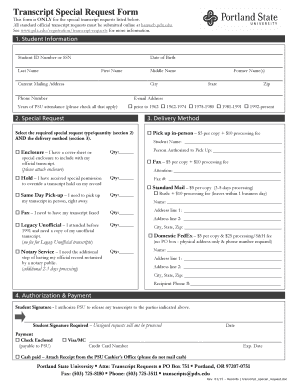
- Begin with 'Student Information' by entering your student ID number or Social Security Number, last name, date of birth, first name, middle name, current mailing address, city, phone number, former name(s), state, zip code, and email address. Additionally, indicate the years of attendance at PSU by checking all applicable options.
- In the 'Special Request' section, review the available request types and quantity. Select the appropriate special request you need and indicate the quantity required.
- Proceed to 'Delivery Method,' where you will select how you would like to receive your transcript. Options include pickup in person, fax, standard mail, rush delivery, and domestic FedEx. Fill out any additional requested information for your chosen method, including recipient details if applicable.
- For 'Authorization & Payment,' sign to authorize PSU to release your transcripts. Unsigned requests cannot be processed. Indicate your payment method by checking the appropriate option and providing necessary details such as a credit card number or payment confirmation for cash.
- Review the completed form for accuracy and completeness. Once confirmed, you can save your changes, download a copy for your records, print out the finalized form, or share it as needed.
Complete your Transcript Special Request Form online today for efficient processing of your transcript needs.
Unofficial transcripts for noncredit courses are available to view and print from your Noncredit Student Portal. For assistance accessing the portal, please contact learn@pdx.edu, or to request a transcript, please contact cepe@pdx.edu.