Loading
Get Canada Fin 144/web 2018-2026
How it works
-

Open form follow the instructions
-

Easily sign the form with your finger
-

Send filled & signed form or save
How to fill out the Canada FIN 144/WEB online
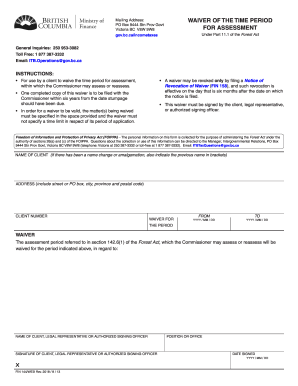
Filling out the Canada FIN 144/WEB form can be a straightforward process with the right guidance. This document serves as a waiver of the time period for assessment, allowing users to provide the necessary information accurately and efficiently.
Follow the steps to complete the Canada FIN 144/WEB form online.
- Press the ‘Get Form’ button to obtain the Canada FIN 144/WEB form and open it in your desired editor.
- Fill in the 'Name of Client' field. If there has been a name change or if the client has amalgamated, indicate the previous name in brackets.
- Provide the complete 'Address' of the client, including street or PO box, city, province, and postal code.
- Enter the 'Client Number' associated with the account. Ensure this number is accurate to prevent any processing issues.
- In the 'Waiver For' section, specify the period for which the waiver is applicable.
- Indicate the 'From' and 'To' dates for the waiver period using the YYYY/MM/DD format.
- In the 'The Period' section, confirm that the assessment period referred to in the attached document is included in the waiver.
- Provide the 'Name of Client, Legal Representative or Authorized Signing Officer' relevant to this waiver.
- Specify the 'Position or Office' of the person signing the document.
- Have the 'Signature of Client, Legal Representative or Authorized Signing Officer' entered in the appropriate space.
- Finally, fill in the 'Date Signed' field using the YYYY/MM/DD format to denote when the form was signed.
- Upon completing the form, you may save changes, download, print, or share the completed Canada FIN 144/WEB form as necessary.
Start completing your Canada FIN 144/WEB form online today for a timely submission.
Upgrading your browser to access the CRA's online services Chrome. Firefox. Internet Explorer. Safari.