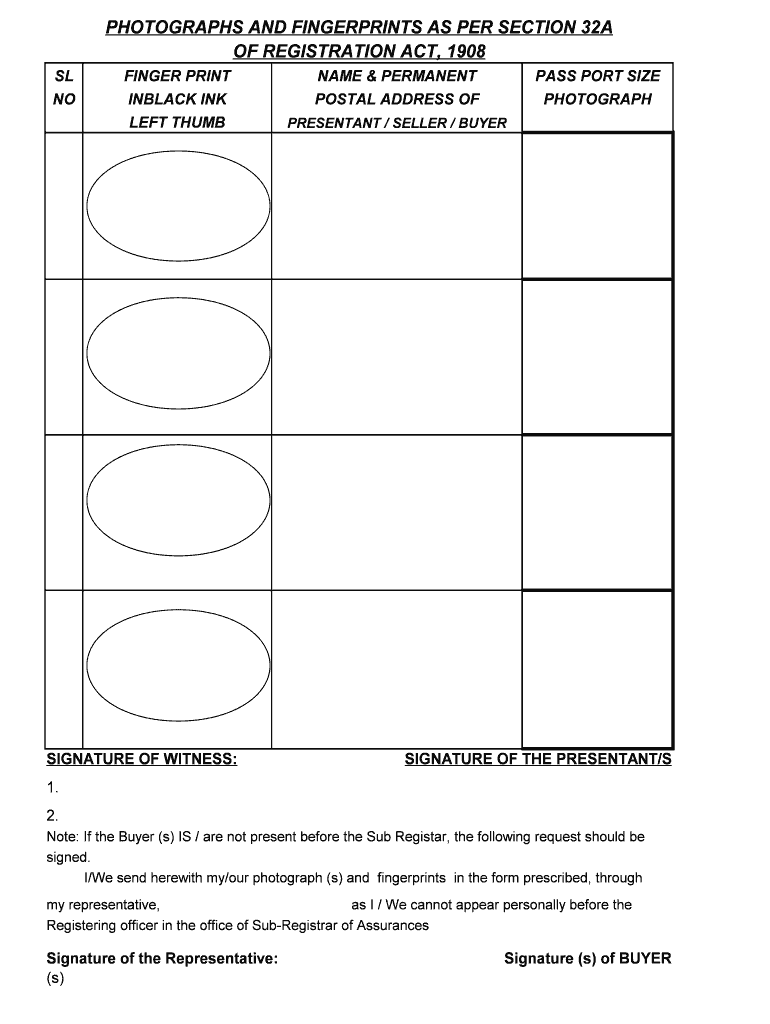
PHOTOGRAPHS AND FINGERPRINTS AS PER SECTION 32A OF REGISTRATION ACT, 1908 SL NOFINGER PRINT INBLACK INK LEFT THUMBSIGNATURE OF WITNESS:NAME & PERMANENT POSTAL ADDRESS OFPASS PORT SIZE PHOTOGRAPHPRESENTANT.

Open form follow the instructions

Easily sign the form with your finger

Send filled & signed form or save
How to fill out the FINGER PRINT online
Filling out the FINGER PRINT form online is a crucial step in ensuring proper identification and legal documentation. This guide provides clear, step-by-step instructions to assist users in completing the form accurately.
Follow the steps to successfully complete the FINGER PRINT form online.
- Press the ‘Get Form’ button to access the FINGER PRINT document and open it in your chosen editor.
- Begin with the fingerprint section. Use black ink to clearly capture your left thumbprint within the designated area.
- In the next field, sign your name in the signature section provided for the witness. Ensure that the witness is someone who can legally validate your identity.
- Next, provide your name and permanent postal address in the designated section to ensure accurate identification.
- Insert a passport-sized photograph of yourself in the specified area. Ensure that the photograph complies with any guidelines provided (if applicable).
- If you are the presentant, seller, or buyer, sign your name in the area labeled ‘SIGNATURE OF THE PRESENTANT/S.’ Make sure your signature is clear and matches the one on your ID.
- If the buyer is not present before the Sub-Registrar, ensure the following request is clearly written: 'I/We send herewith my/our photograph(s) and fingerprints in the form prescribed, through my representative, as I/We cannot appear personally before the Registering officer in the office of Sub-Registrar of Assurances.'
- Have your representative sign in the section labeled ‘Signature of the Representative(s)’.
- Lastly, if applicable, the signatures of the buyer(s) should be collected in the provided area to validate the document.
- Once all sections are completed, ensure that you save your changes, and download or print the form as needed for submission.
Complete your documents online today and ensure all required information is accurately submitted.
Experience a faster way to fill out and sign forms on the web. Access the most extensive library of templates available.
Related content
As of January 1, 2019, there were 762,811 active fingerprint clearance cards in use. The...
Image: Fingerprint detail on male finger: ... Finger Prints, Palms and Soles: An...
A fingerprint is an impression left by the friction ridges of a human finger. The recovery...
Get answers to your most pressing questions about US Legal Forms API.
Can I get fingerprinted at local police station?
1. Contact your local police station to schedule a time to get fingerprinted. 3. Bring the Fingerprint card and the Authorization for Release of Information form with you to the police station.
Which of the 3 main types of fingerprints is most common?
Loop. The loop is the most common type of fingerprint. The ridges form elongated loops. Some people have double loop fingerprints, where the ridges make a curvy S shape.
What are the 3 main types of fingerprint patterns?
There are three different types of fingerprints: patent, plastic, or latent. Patent prints can be seen without chemicals or equipment. Fingers that are dirty from blood, paint, or ink leave patent prints. Sweat and oil can also leave patent prints on glass or metal surfaces.
What are the 3 types of fingerprints that can be left at a crime scene?
There are three main fingerprint patterns, called arches, loops and whorls.
What are the 4 types of fingerprints?
Plain (concentric circles), Central pocket loop (a loop with a whorl at the end), Double loop (two loops that create an S-like pattern) Accidental loop (irregular shaped).
Can you have all 3 types of fingerprints?
The term fingerprints refers to the FRS on the ends of our fingers. Fingerprints have a general flow to the ridges that translates into one of three major pattern types: a whorl, loop or arch. It is possible to have just one, two or all three pattern types among your 10 fingerprints.
What is the meaning of finger print?
fingerprint. noun. fin·ger·print. : the impression of a fingertip on any surface. also : an ink impression of the lines upon the fingertip taken for the purpose of identification (as during the booking procedure following an arrest) see also dna fingerprinting.
What are the 3 types of fingerprints?
Although every fingerprint is different, they're all variations on three broad categories: the arch, which looks a bit like a cross-section of a hill; the loop, which is teardrop-shaped; and the whorl, which is reminiscent of a whirlpool.
Use professional pre-built templates to fill in and sign documents online faster. Get access to thousands of forms.
If you believe that this page should be taken down, please follow our DMCA take down process here.