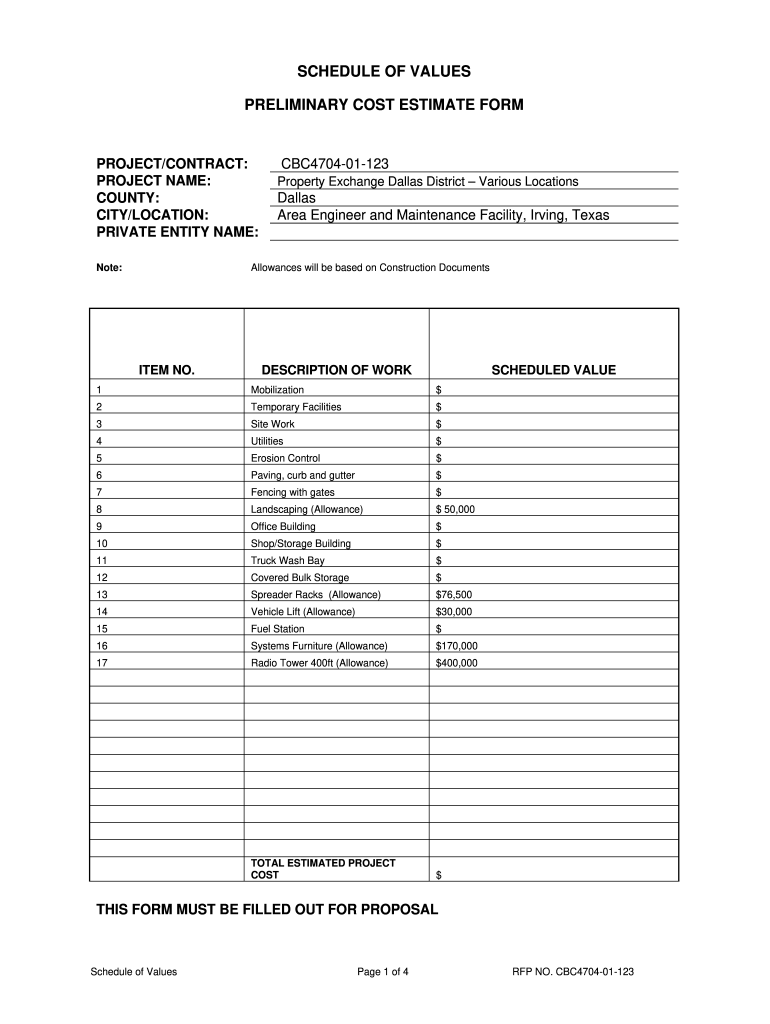
SCHEDULE OF VALUES PRELIMINARY COST ESTIMATE FORM PROJECT/CONTRACT: PROJECT NAME: COUNTY: CITY/LOCATION: PRIVATE ENTITY NAME: Note: CBC4704-01-123 Property Exchange Dallas District Various Locations.
Loading

Open form follow the instructions

Easily sign the form with your finger

Send filled & signed form or save
How to fill out the Subcontractor Schedule Of Values online
The Subcontractor Schedule Of Values is a crucial document that outlines the anticipated costs associated with a construction project. This guide provides step-by-step instructions on how to complete this form online, ensuring clarity and accuracy throughout the process.
Follow the steps to effectively complete your Schedule Of Values form.
- Click the ‘Get Form’ button to access the form and open it in your preferred online editor.
- Enter the project and contract details in the designated fields, including the project name, county, city or location, and the private entity name.
- Review the list of work items under the 'DESCRIPTION OF WORK' section. Each item corresponds to specific tasks required for the project.
- Assign a scheduled value to each work item in the 'SCHEDULED VALUE' column. Ensure these values reflect accurate estimations based on construction documents.
- For any allowances indicated (like landscaping or systems furniture), be sure to specify the amounts clearly and verify that they are supported by the project documentation.
- Calculate the total estimated project cost by adding together all scheduled values listed, then input the grand total into the appropriate field.
- Review all information for accuracy and completeness, making any necessary corrections before finalizing the document.
- Once all sections are completed, you can save your changes, download the form, print it, or share it as needed.
Start filling out your Subcontractor Schedule Of Values online today for a streamlined project management experience.
Experience a faster way to fill out and sign forms on the web. Access the most extensive library of templates available.
Related content
2, This worksheet has 10 pages for the Contractor's Schedule of Values. There is the front...
CONTRACTOR'S/ASSIGNED SUBCONTRACTOR'S. SCHEDULE OF VALUES. (LUMP SUM CONTRACTS). COST...
and Subcontractors that work with PennDOT and the ECMS system. ... values differ, the...
Get answers to your most pressing questions about US Legal Forms API.
Who is primarily responsible for approving a certificate of payment?
Contracting Officer (CO) – serves as a certifying officer with the responsibility for “approving payments” to contractors by verifying the accuracy and propriety of all documents and records upon which payment to the contractor is based and ensuring that the payment is legal, correct, and proper.
What is the primary purpose of a schedule of values?
The primary purpose of a schedule of values is to function as a start-to-finish document that outlines everything the project will entail. A well thought out schedule of values will serve as the backbone of a contractor's billing process and becomes an invaluable management tool for any type of contractor.
How to approve subcontractor schedule of values in procore?
Steps Navigate to the project's Commitments tool. Under the Contracts tab, locate the purchase order or subcontract. Then click Edit. Click the Subcontractor SOV tab. Optional: To edit the line items on the Subcontractor SOV tab, click Edit. Review the line items on the Subcontractor SOV tab. ... Click Submit.
Who prepares the schedule of values?
Prior to beginning a construction project, the prime general contractor or sometimes a second-tier subcontractor (who's hired directly by the general contractor) creates the Schedule of Values by assigning a dollar amount to every item of work they need to do, and in what phase of the project, in order to get the job ...
Which party typically reviews and certifies the contractor's final application for payment?
On most public construction projects, the Architect reviews the Contractor's monthly Applications for Payment (a.k.a. “Requisitions”) and certifies the amount to be paid to the Contractor for that month.
What should be included in a schedule of values?
What Should a Schedule of Values Include? Project name and number. Name of the prime or general contractor. Application number and date. Work item numbers. Description of work items. Total value of each item. Percentage of work completed. Value of work completed for past and current periods.
How do you fill out a schedule of values in construction?
However, the general format to expect will include columns with the following details: The description of each item of work. ... The total cost for each item. What you've been paid to date on the work, from prior billing periods. The percentage of the work that's been completed. Your costs for the current billing period.
Who reviews the schedule of values used to certify payments to the contractor?
The Payment application is then reviewed by the Architect/Engineer of Record and approved by the project owner (or the owner's representative).
Use professional pre-built templates to fill in and sign documents online faster. Get access to thousands of forms.
If you believe that this page should be taken down, please follow our DMCA take down process here.