Loading
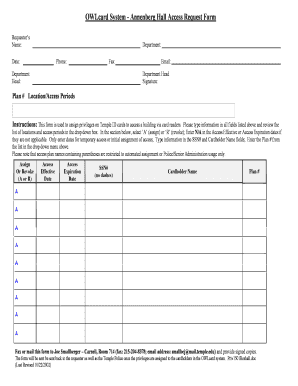
Get Owlcard System - Annenberg Hall Access Request Form
How it works
-

Open form follow the instructions
-

Easily sign the form with your finger
-

Send filled & signed form or save
How to fill out the OWLcard System - Annenberg Hall Access Request Form online
This guide provides a comprehensive overview of how to effectively complete the OWLcard System - Annenberg Hall Access Request Form online. Following these steps will help ensure that all necessary information is accurately provided for access privileges.
Follow the steps to complete the online access request form.
- Click the ‘Get Form’ button to retrieve the OWLcard System - Annenberg Hall Access Request Form and open it in an editing environment.
- Begin by filling out the requestor’s name in the designated field, ensuring that it accurately reflects the individual completing the form.
- Provide the department name associated with the requestor to confirm the relevant organizational unit.
- Enter the current date in the appropriate field to indicate when the request is being made.
- Include a phone number where the requestor can be reached to facilitate communication.
- If applicable, fill in the fax number to provide an additional method of contact.
- Input the requestor’s email address for electronic correspondence regarding the request.
- The department head’s signature is required. Ensure this is completed by the relevant authority to validate the request.
- Specify the department head’s name in the respective section to confirm who authorizes the access request.
- Select the appropriate plan number from the dropdown menu that pertains to the desired locations and access periods.
- In the section for assigning or revoking access, select either ‘A’ for assign or ‘R’ for revoke as applicable.
- If access effective or expiration dates are not applicable, type ‘N/A’ in the respective fields.
- Only enter dates if they pertain to temporary access or initial assignment of access privileges.
- Fill in the Social Security Number (SSN#) without dashes and the name of the cardholder in the specified fields.
- Enter the plan number again, ensuring it corresponds to the dropdown option previously selected.
- After all fields have been completed, review the form for accuracy before proceeding.
- The completed form should then be faxed or mailed to Joe Smallberger at Carnell, Room 714. Include the fax number (215-204-8378) and email address (smallbej@mail.temple.edu) for return confirmation.
- Upon submission, the form will be processed and returned to the requester as well as to the Temple Police, confirming that the privileges have been successfully assigned.
- Finally, users can save any changes made to the form, download it for their records, print it as needed, or share it with relevant parties.
Complete your OWLcard System - Annenberg Hall Access Request Form online today!
Related links form
Harvard does have a system of Houses that serve as unique communities for students, similar to the concept in Hogwarts. Each House offers distinctive traditions, housing options, and social activities. This system supports an inclusive atmosphere for students, making it an integral part of the Harvard experience and a theme worth exploring when using the OWLcard System - Annenberg Hall Access Request Form.