S paid in the irst four of the last ive completed calendar quarters immediately preceding the Sunday of the week in which you ile your claim. If there are insuficient wages in those quarters, the wages in the last four completed quarters will be used. For example, if you iled for beneits on Wednesday, November 12, 2011, the wages paid during the calendar quarters below would be used to compute your beneit entitlement. July 1, 2011 through September 30, 2011 April 1, 2011 through June 30, 2011 Ja.
Loading

Open form follow the instructions

Easily sign the form with your finger

Send filled & signed form or save
How to fill out the MI UIA 1538 online
Completing the MI UIA 1538 form online is an essential step for individuals seeking to file an unemployment claim in Michigan. This guide provides clear, step-by-step instructions to help you navigate the process efficiently.
Follow the steps to fill out the MI UIA 1538 form online
- Click ‘Get Form’ button to access the MI UIA 1538 form and open it in your preferred online editor.
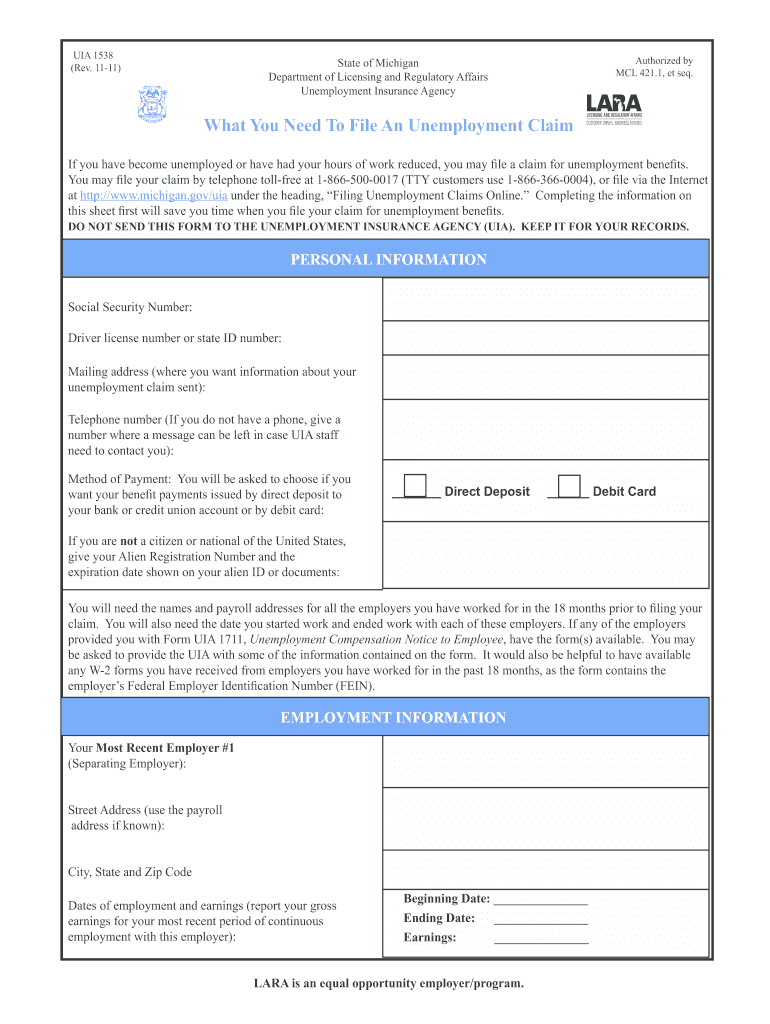
- Begin by entering your personal information. Include your Social Security Number, driver license number or state ID number, and your preferred mailing address where your claim information will be sent. Ensure that you provide a contact telephone number for any necessary communication from the Unemployment Insurance Agency (UIA).
- Choose your preferred method of payment. You can select either direct deposit to a banking account or debit card. Mark the corresponding box for your choice.
- If applicable, provide your Alien Registration Number and the expiration date from your alien ID or documents, especially if you are not a citizen or national of the United States.
- Gather the names and payroll addresses of all employers you have worked for in the past 18 months. Document the start and end dates for each employment, and include the gross earnings from your most recent employer.
- For each employer, fill in the required employment information. This includes the employer's name, payroll address, city, state, zip code, and the dates of your employment.
- Ensure all entered dates are in the correct format: two digits for the month, two digits for the day, and four digits for the year (e.g., 10/03/2011).
- Verify that you have adequate documentation, such as any W-2 forms or Form UIA 1711 from your previous employers, to support your claim. This ensures that you have the necessary information for potential follow-up.
- After completing the form, review all sections for accuracy. Once confirmed, you can save the changes, download your completed form, print it, or share it as needed.
Start filling out the MI UIA 1538 form online today to ensure your unemployment claim is processed smoothly.
Experience a faster way to fill out and sign forms on the web. Access the most extensive library of templates available.
Related content
Search for a form, fact sheet or publication here. You may search by the form number or by...
Webmanage your tax account and learn how to navigate michigan's unemployment insurance...
Get answers to your most pressing questions about US Legal Forms API.
How do I settle my unemployment overpayment in Michigan?
To settle an unemployment overpayment in Michigan, you must first review the amount owed and understand the reason for the overpayment. The MI UIA 1538 provides clear steps for repayment, including options for negotiating or appealing if necessary. Seeking assistance from platforms like uslegalforms can help you navigate this process smoothly.
How much unemployment will I get if I make $1000 a week in Michigan?
If you earned $1000 a week in Michigan, your unemployment benefits will depend on your total earnings over the past year and the calculations from the MI UIA 1538. Typically, your weekly benefit might be a fraction of your previous income, calculated to help you during your job search. It is best to review the monetary determination for precise figures.
What is a Michigan UIA debit card?
The Michigan UIA debit card is a financial card used to receive unemployment benefits. Instead of receiving paper checks, beneficiaries can access their funds through this card, making it more convenient. The MI UIA 1538 process ensures that funds are loaded onto the debit card, allowing you quick access to your unemployment payments.
What does monetary redetermination mean for unemployment?
Monetary redetermination refers to a review of your eligibility for unemployment benefits after an initial determination. If new information arises, such as additional earnings or employment, the MI UIA 1538 will reassess your case. This process ensures that your benefits remain accurate and reflect your current situation.
What is the monetary determination for unemployment in Michigan?
The monetary determination for unemployment in Michigan is a calculation that determines your weekly benefit rate based on your work history and earnings. The MI UIA 1538 evaluates your income over a specific period to establish how much assistance you may receive. Knowing your monetary determination helps you plan your finances during unemployment.
Who is eligible for UIA Michigan?
Eligibility for UIA Michigan typically includes individuals who have lost their job through no fault of their own and who meet specific wage requirements. Those who worked in Michigan and contributed to the unemployment insurance system are often qualified under the MI UIA 1538 guidelines. It is important to review your employment history and contributions to ensure eligibility.
What does monetary determination mean for unemployment in Michigan?
Monetary determination in Michigan assesses your earnings to establish your eligibility for unemployment benefits. The MI UIA 1538 process calculates your weekly benefit amount based on your reported wages during a certain period. Understanding this determination is crucial as it sets the groundwork for the benefits you may receive.
Does a monetary determination letter mean approved?
Receiving a monetary determination letter does not automatically indicate approval for unemployment benefits. The MI UIA 1538 process involves reviewing your eligibility based on the information you provided. A positive letter means your earnings qualify you for benefits, but you must also meet other requirements to receive approval.
How do I get a Mi UIA account number?
To get a Mi UIA account number, you need to register on the Michigan Unemployment Insurance Agency's online system. After providing required information about your employment and identity, the system will create your account and assign you a unique account number. This account number is crucial for managing your unemployment benefits. Leveraging tools like the MI UIA 1538 guide available on uslegalforms can help clarify any steps for you.
How do I get a UIA number in Michigan?
To obtain a UIA number in Michigan, you can register through the Michigan UIA's online portal. During registration, you may need to provide essential details about your work history and current income. Once you submit your information, the system will generate your UIA number. Remember that having your MI UIA 1538 form handy can streamline this process.
Use professional pre-built templates to fill in and sign documents online faster. Get access to thousands of forms.
If you believe that this page should be taken down, please follow our DMCA take down process here.
This form is available in several versions. Select the version you need from the drop-down list below.