Loading
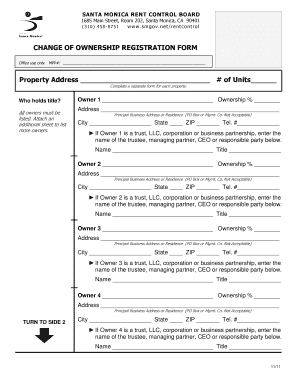
Get Change Of Ownership Registration Form - Smgov
How it works
-

Open form follow the instructions
-

Easily sign the form with your finger
-

Send filled & signed form or save
How to fill out the CHANGE OF OWNERSHIP REGISTRATION FORM - Smgov online
Filling out the Change of Ownership Registration Form is an essential process for updating ownership details with the Santa Monica Rent Control Board. This guide provides step-by-step instructions to help you complete the form accurately and efficiently.
Follow the steps to successfully fill out the form online.
- Click the ‘Get Form’ button to obtain the form and open it in the designated editor.
- Begin by entering the property address in the designated field. Specify the number of units available at this property. If there are multiple properties, ensure to complete a separate form for each property.
- Identify who holds the title to the property by filling in the information for Owner 1. Include the owner's name and their percentage of ownership. If there are more owners, attach an additional sheet as necessary.
- Provide the principal business address or residence for Owner 1. P.O. boxes and management company addresses are not acceptable. Enter the city, state, ZIP code, and telephone number.
- If Owner 1 is a trust, LLC, corporation, or business partnership, enter the name of the trustee, managing partner, CEO, or responsible party in the specified section.
- Repeat steps 3 to 5 for Owners 2, 3, and 4. Ensure that all owners are listed, including their ownership percentages and contact details.
- Indicate the date of the change in ownership and the date of the most recent title change. Provide the name of the former owner.
- Select the address where you would like all Rent Control mail and bills to be sent. Only check one option.
- If someone else will be authorized to sign Rent Control documents on your behalf, select the appropriate option from Owner 1, Owner 2, Owner 3, Owner 4, or specify an authorized agent.
- Fill in the name and address of the authorized agent if applicable. Ensure that the agent’s details are complete, including city, state, ZIP code, and telephone number.
- At least one original signature is required. Have the owners sign where indicated, ensuring the signature corresponds with the printed name and date the document is signed. Note that faxes and photocopies are not acceptable.
- Review the completed form for any errors or missing information before saving changes. Once satisfied, you can download, print, or share the form as needed.
Fill out your documents online today to ensure a smooth transition of ownership.
Industry-leading security and compliance
US Legal Forms protects your data by complying with industry-specific security standards.
-
In businnes since 199725+ years providing professional legal documents.
-
Accredited businessGuarantees that a business meets BBB accreditation standards in the US and Canada.
-
Secured by BraintreeValidated Level 1 PCI DSS compliant payment gateway that accepts most major credit and debit card brands from across the globe.