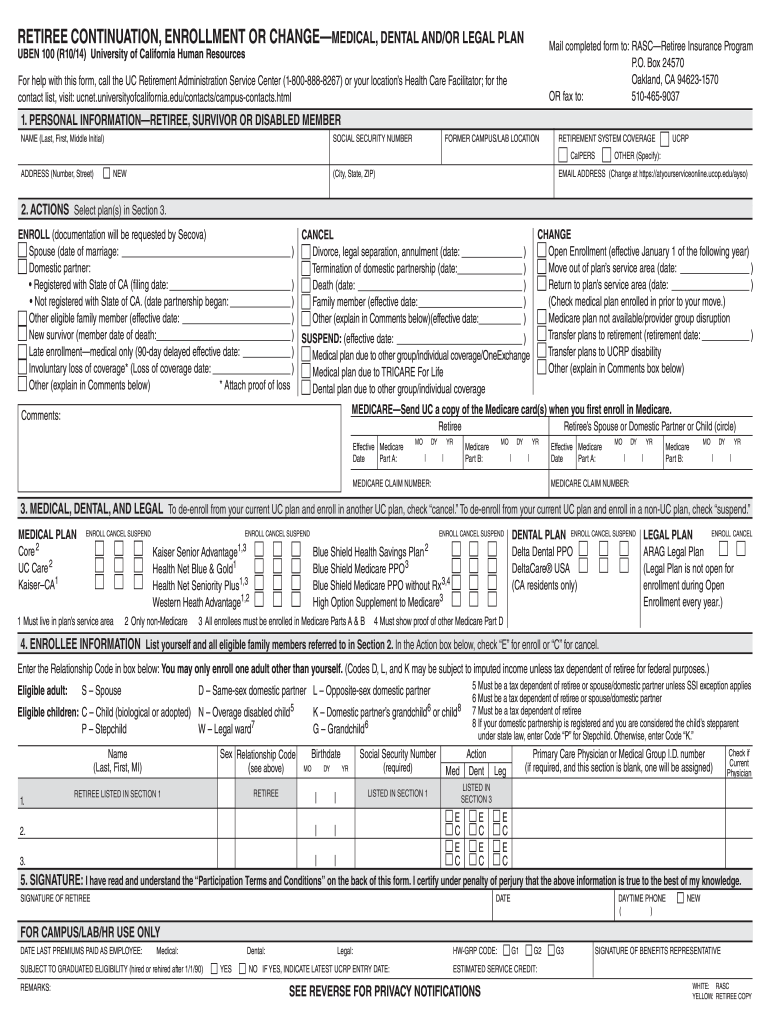
-9037 UBEN 100 (R10/14) University of California Human Resources For help with this form, call the UC Retirement Administration Service Center (1-800-888-8267) or your location’s Health Care Facilitator; for the contact list, visit: ucnet.universityofcalifornia.edu/contacts/campus-contacts.html 1. PERSONAL INFORMATION—RETIREE, SURVIVOR OR DISABLED MEMBER NAME (Last, First, Middle Initial) SOCIAL SECURITY NUMBER FORMER CAMPUS/LAB LOCATION RETIREMENT SYSTEM COVERAGE CalPERS ADDRESS .
Loading

Open form follow the instructions

Easily sign the form with your finger

Send filled & signed form or save
How to fill out the CA UBEN 100 online
Filling out the CA UBEN 100 form is a crucial step for retirees or their family members to manage their medical, dental, and legal plan enrollments. This guide will walk you through the process clearly and effectively, ensuring you understand each section of the form.
Follow the steps to complete the CA UBEN 100 form online.
- Click 'Get Form' button to obtain the form and open it in the editor.
- In Section 1, fill in your personal information. Provide your legal name, Social Security number, former campus or lab location, and indicate your retirement system coverage (CalPERS or UCRP). Ensure your current address is accurate, including your email address, which can be updated at the specified online address.
- In Section 2, select the appropriate action you wish to take. This could be enrolling in a plan, changing your current plan, or canceling coverage. Indicate any relevant dates associated with marital status changes or other life events, as needed.
- Proceed to Section 3, which focuses on your medical, dental, and legal plan selections. Check the boxes for the plans you wish to enroll in, cancel, or suspend.
- Move to Section 4, where you will list yourself and any eligible family members. Provide the relationship code for each individual and ensure their details are correctly filled out, including names and birthdates.
- In Section 5, you must sign and date the form indicating that you have read and understood the Participation Terms and Conditions. Make sure your daytime phone number is also provided.
- Finally, review all information you've entered on the form for accuracy. Once completed, you can save changes, download, print, or share the form as necessary.
Complete your CA UBEN 100 form online today to ensure your benefits are managed effectively.
Experience a faster way to fill out and sign forms on the web. Access the most extensive library of templates available.
Related content
APPROVED Claremont, CA Urban Forest Management Plan-Adopted 2/25/20. Executive Summary...
UBEN 100 (R10/21) University of California Human Resources. Mail completed RASC form to:...
256 Sounds, 256 Setups. Das MP6 verfügt nicht nur über akustische Pianos und E.Pianos...
Get answers to your most pressing questions about US Legal Forms API.
How to file CA form 199?
To file CA form 199, which is your California Exempt Organization Annual Information Return, you can typically download the form online from the California Franchise Tax Board website. After filling out the required information, you can e-file it or send it via mail. Ensure your organization complies with all guidelines to avoid any penalties. Utilizing resources such as CA UBEN 100 can provide you with valuable insights on correctly completing this form.
How to file California corporate disclosure statement online?
Filing a California corporate disclosure statement online starts with accessing the California Secretary of State's website. From there, locate the corporate disclosure section and complete the online form. Remember to have your business information and identification numbers on hand for ease. For additional assistance, tools like CA UBEN 100 are available to help simplify the process.
How to file a fictitious business name renewal in California?
To file a fictitious business name renewal in California, you need to visit your county's office where you initially registered your business name. Ensure that you have the necessary forms ready, and complete them accurately. You may submit your renewal application online or in person, depending on your county's regulations. For a seamless process, consider using CA UBEN 100 to guide you through the steps.
How to fill out Form Sum 100?
Filling out Form Sum 100 requires careful attention to detail. Start by providing your information and that of the person you are summoning. Follow the CA UBEN 100 guidelines to ensure all sections are complete, including the nature of your claim. Lastly, review the form for accuracy and submit it to the appropriate court.
How to answer a summons without an attorney in California?
Answering a summons without an attorney in California is possible by following the CA UBEN 100 instructions. You should file a written response with the court, stating whether you admit or deny each claim. Use clear language and be concise in your answers, as this will help the judge understand your position. Consider using online resources like UsLegalForms for templates and guidance.
How do you summons someone?
To summon someone, you must first prepare a summons document that outlines the legal action. File this document with the court and obtain a case number. After that, serve the summons to the individual, following the CA UBEN 100 rules for proper service. Be sure to document the service to confirm it is complete.
How to write a written response to a summons?
To write a written response to a summons, begin by addressing the court at the top of your document. Clearly state your name and contact information, as well as the case number. In your response, reference the CA UBEN 100 guidelines to ensure you include all required information. End with your signature and the date to verify your submission.
What is the SB 100 goal in California?
The goal of SB 100 in California is to achieve a 100% clean energy future by a set date, transitioning the state away from fossil fuels. This legislation aims to enhance sustainability and reduce greenhouse gas emissions. Understanding the implications of CA UBEN 100 will be crucial as the state moves towards these ambitious energy goals, and USLegalForms is here to keep you informed and prepared.
How to get admission in California University?
Getting admission to a California University typically requires completing an application, submitting your academic records, and fulfilling other specific requirements. Many institutions consider factors such as standardized test scores and personal statements. If you're also looking into educational programs related to CA UBEN 100, USLegalForms provides valuable information and tools to guide you through the admission process.
What are the requirements for SB100 in California?
The requirements for SB100 in California generally include vehicle age, emissions ratings, and compliance with specific environmental standards. You'll also need to confirm that your vehicle does not exceed the pollution limits established by state regulations. Make sure to refer to CA UBEN 100 guidelines, and USLegalForms offers helpful resources to meet these requirements.
Use professional pre-built templates to fill in and sign documents online faster. Get access to thousands of forms.
If you believe that this page should be taken down, please follow our DMCA take down process here.
This form is available in several versions. Select the version you need from the drop-down list below.