Loading
Get Ny Rb-89.1 2018
How it works
-

Open form follow the instructions
-

Easily sign the form with your finger
-

Send filled & signed form or save
How to fill out the NY RB-89.1 online
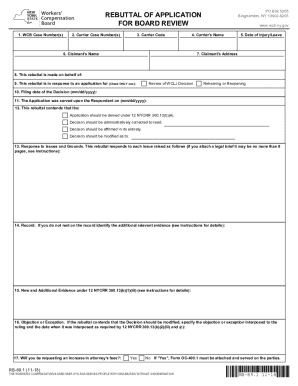
Completing the NY RB-89.1 form online is a crucial step in the rebuttal process for application for board review. This guide will provide clear and concise instructions on how to navigate each section effectively.
Follow the steps to successfully complete the form online.
- Click ‘Get Form’ button to access the form and open it in your preferred editor.
- Enter the WCB Case Number(s) associated with the claim(s) you are appealing in the designated field.
- In the next field, input the Carrier Case Number(s) for the claim(s) being appealed, noting that this is not applicable for discrimination claims.
- Fill in the Carrier Code of the insurer linked to the claim. This is also not applicable for discrimination claims.
- Provide the name of the Carrier relevant to your appeal in the corresponding section.
- Enter the date of injury or the start date of paid family leave in the appropriate field.
- Include the full name of the claimant, which refers to the employee involved.
- Fill in the claimant's address, including street, city, state, and ZIP code.
- Indicate which party is filing this rebuttal using the provided options.
- Specify the type of application that your rebuttal responds to, choosing between a WCLJ Decision review or a rehearing/reopening request.
- Input the date that the decision being appealed was issued.
- Document the date on which the Application was served upon the Respondent.
- State the desired outcome for the rebuttal by checking the relevant options provided.
- Draft your response to the issues raised in the application, and if necessary, attach a legal brief that complies with the specified guidelines.
- Identify any additional documents or hearings that are pertinent to the appeal that were not included in the original application.
- If new evidence is included, clearly state what it is and attach a sworn affidavit explaining its relevance.
- If applicable, indicate whether you're requesting an increase in attorney's fees and attach Form OC-400.1 if so.
- The preparer must complete the certification section by signing and dating the form, providing their contact information as required.
- Fill out the proof of service, ensuring it details the service method, recipients’ names, and dates, and complete either an affirmation or affidavit.
- Once all sections are completed, you can save changes, download, print, or share the form as needed.
Complete your documents online today to ensure an efficient process.
Get form
Experience a faster way to fill out and sign forms on the web. Access the most extensive library of templates available.
Get This Form Now!
Use professional pre-built templates to fill in and sign documents online faster. Get access to thousands of forms.