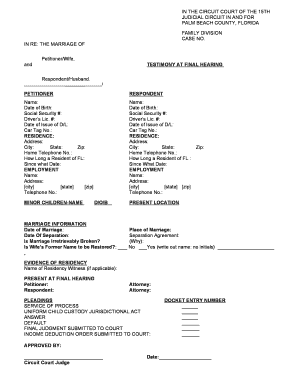
Get Testimony At Final Hearing Petitioner Respondent - Palmbeachbar
How it works
-

Open form follow the instructions
-

Easily sign the form with your finger
-

Send filled & signed form or save
How to fill out the TESTIMONY AT FINAL HEARING PETITIONER RESPONDENT - Palmbeachbar online
This guide provides you with clear instructions on how to fill out the TESTIMONY AT FINAL HEARING PETITIONER RESPONDENT form for Palm Beach County online. You will find comprehensive steps tailored for users with varying levels of legal experience.
Follow the steps to complete your form accurately.
- Click ‘Get Form’ button to access the form and open it in your preferred document editor.
- Begin by filling in the Petitioner and Respondent sections. Include the full names, dates of birth, social security numbers, driver’s license numbers, and relevant residence information, such as address, city, state, and zip code.
- Provide contact details for both parties, including home telephone numbers and details regarding your residency in Florida, such as how long you have lived in the state and the specific date of residency.
- Input employment details for both the Petitioner and Respondent, including the name of the employer, their address, city, state, zip code, and a telephone number for the employer.
- List any minor children involved in the case by filling out their names and dates of birth.
- Complete the marriage information section with the date of marriage, date of separation, and answer whether the marriage is irretrievably broken. If applicable, indicate if the wife's former name should be restored.
- Provide details about the place of marriage and any separation agreement, including reasons for the agreement, if it applies.
- If applicable, include the name of any residency witness present at the final hearing.
- List the names of both the Petitioner and Respondent as present at the final hearing, and include information about their legal representatives.
- Fill in any relevant sections regarding pleadings, service of process, uniform child custody jurisdictional act, and submissions made to the court, ensuring all necessary entries are completed.
- Finalize the document by having it approved and signed by a Circuit Court Judge before submitting it.
- After completing the form, save your changes, and download or print the document. You may also choose to share it as needed.
Start completing your documents online now to ensure a smooth filing process.
Related links form
Proposed orders for all Civil Court case types must be submitted directly to the court through the 15th Judicial Circuit's Online Scheduling System (OLS). Proposed orders cannot be submitted in person, by mail, by fax or by email to the court or to the Clerk's office. How to Submit a Proposed Order - Palm Beach County Clerk Palm Beach County Clerk https://.mypalmbeachclerk.com › attorneys-paralegals Palm Beach County Clerk https://.mypalmbeachclerk.com › attorneys-paralegals