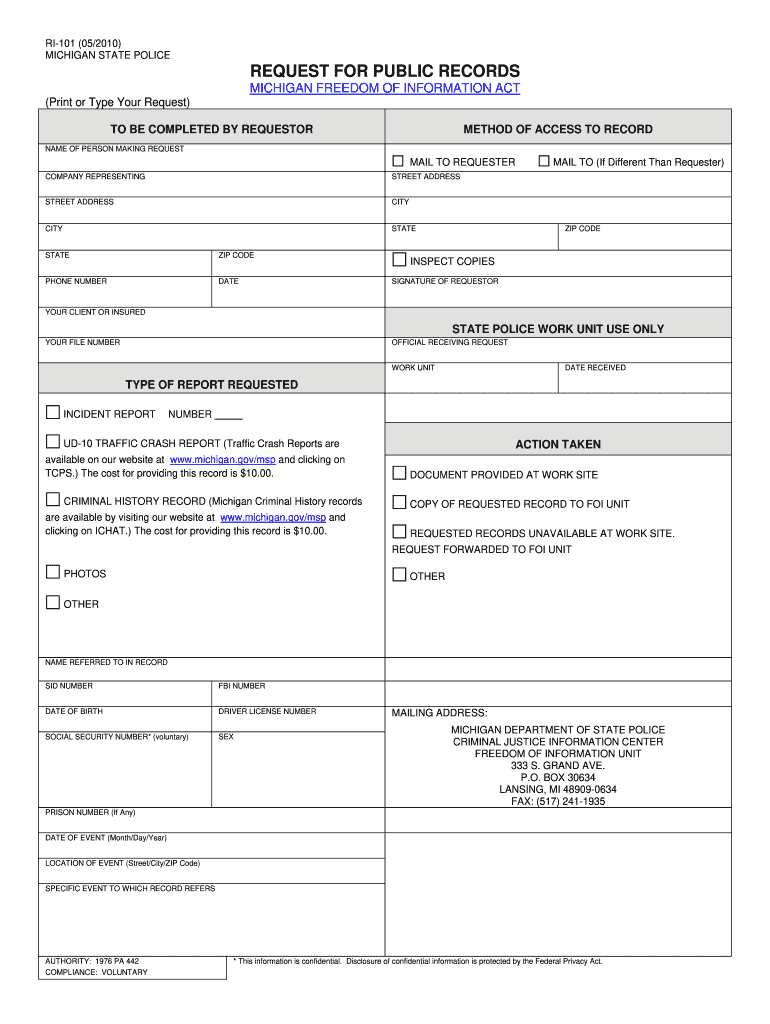
RI-101 05/2010 MICHIGAN STATE POLICE REQUEST FOR PUBLIC RECORDS MICHIGAN FREEDOM OF INFORMATION ACT Print or Type Your Request TO BE COMPLETED BY REQUESTOR METHOD OF ACCESS TO RECORD NAME OF PERSON MAKING REQUEST MAIL TO REQUESTER COMPANY REPRESENTING STREET ADDRESS CITY STATE MAIL TO If Different Than Requester ZIP CODE PHONE NUMBER DATE INSPECT COPIES SIGNATURE OF REQUESTOR YOUR CLIENT OR INSURED STATE POLICE WORK UNIT USE ONLY YOUR FILE NUMBER OFFICIAL RECEIVING REQUEST WORK UNIT DATE RECEIVED TYPE OF REPORT REQUESTED INCIDENT REPORT NUMBER UD-10 TRAFFIC CRASH REPORT Traffic Crash Reports are available on our website at www. michigan*gov/msp and clicking on TCPS* The cost for providing this record is 10. 00. CRIMINAL HISTORY RECORD Michigan Criminal History records are available by visiting our website at www. michigan*gov/msp and clicking on ICHAT. The cost for providing this record is 10. 00. ACTION TAKEN DOCUMENT PROVIDED AT WORK SITE COPY OF REQUESTED RECORD TO FOI UNIT REQUESTE....
Loading

Open form follow the instructions

Easily sign the form with your finger

Send filled & signed form or save
How to fill out the MI RI-101 online
The MI RI-101 is a request form for public records under the Michigan Freedom of Information Act. This guide provides comprehensive and user-friendly instructions for completing the form accurately online.
Follow the steps to complete the MI RI-101 form online.
- Click the ‘Get Form’ button to retrieve the MI RI-101 form and open it in your browser.
- Begin by filling in your personal information in the 'Name of person making request' field. Ensure that your name is clearly printed or typed.
- In the 'Mail to requester' section, input your street address, city, state, and ZIP code for the records to be sent to you.
- If the mailing address is different from the requester's, complete the 'Mail to' section with the relevant address information.
- Provide your phone number to allow for any follow-up regarding your request.
- Enter the date on which you are submitting the form.
- Select your preferred method of access to the record by indicating whether you would like to inspect copies or receive copies.
- Sign in the designated section as the requestor to validate your request.
- If applicable, fill in details regarding the person associated with the records, including name, SID number, FBI number, date of birth, driver license number, and social security number (optional).
- Indicate the type of report you are requesting by checking the appropriate box for an incident report, traffic crash report, or criminal history record.
- If you are requesting specific information, provide the date of the event, location, and a brief description of the specific event related to your record request.
- Review all provided information for accuracy, then save your changes, download, print, or share the completed form as necessary.
Complete your MI RI-101 online today for efficient access to public records.
Experience a faster way to fill out and sign forms on the web. Access the most extensive library of templates available.
Related content
This form allows space for 14 pistols. If more than 14 are purchased, additional RI-060a's...
The JWST Mid-Infrared Instrument (MIRI) provides imaging and spectroscopic observing modes...
Os reguladores da Série M são carregados com mola, abertos à prova de falha, com força...
Get answers to your most pressing questions about US Legal Forms API.
What form do I need to sell a pistol in Michigan?
To sell a pistol in Michigan, you need to complete the appropriate form, specifically the 'Pistol Sales Record.' This form ensures that the transfer of ownership follows state regulations and keeps records for law enforcement. Having the correct documentation helps you have a smooth transaction. You can find the necessary forms and guidance by visiting the US Legal Forms platform, where resources like MI RI-101 can assist you.
What is District 101 state of Michigan?
District 101 in Michigan refers to a specific judicial district that oversees legal matters within its boundaries. This district addresses various cases, including civil disputes and criminal matters. Understanding the structure of District 101 is crucial for anyone navigating the legal landscape in Michigan. For accurate legal forms related to District 101, you can explore the MI RI-101 resources available on US Legal Forms.
What form do you need to transfer a gun?
To transfer a gun in Michigan, you need the MI RI-101 form, which documents the change of ownership. Completing this form is vital for ensuring compliance with state laws and for protecting both the buyer and seller. Always ensure that the form is filled out accurately to prevent future legal issues. For additional assistance, platforms like US Legal Forms can guide you through this process.
What is required to sell a pistol in Michigan?
To sell a pistol in Michigan, you must provide identification, possess a valid pistol sales license, and complete the MI RI-101 form. Additionally, both the seller and buyer should ensure that they comply with state and federal laws concerning firearm sales. This process is crucial for a smooth transaction and protects all parties involved. Consider using US Legal Forms to navigate these requirements effectively.
Can you mail pistol registration in Michigan?
In Michigan, you cannot mail pistol registration forms directly. Instead, after completing the MI RI-101 form, you must submit it in person to your local law enforcement agency. This requirement helps to ensure compliance with state laws and facilitates proper record-keeping. Utilizing the US Legal Forms platform can simplify your understanding of these regulations.
Can I buy a gun from a private seller in Michigan?
Yes, you can buy a gun from a private seller in Michigan. However, it's important to follow state regulations. The MI RI-101 outlines the procedures you must take to ensure a legal transfer. Always ensure that you understand the necessary laws before completing any transaction.
How to submit W-2 to state of Michigan?
To submit a W-2 to the state of Michigan, you generally need to file it along with your state tax return using Form MI-1040. Ensure that the information on the W-2 matches your tax return to avoid issues. If you are an employer, you must also file W-2 forms with the Michigan Department of Treasury electronically or by mail.
How do I file Michigan sales tax?
To file Michigan sales tax, you need to complete Form 5080, the Sales Tax Return. You'll provide information about your total sales and calculate the tax due based on those sales. Submitting the form can be done online or via mail, depending on what is most convenient for you.
What forms do I need to file my taxes in Michigan?
When filing your taxes in Michigan, you typically need to use Form MI-1040, along with any necessary supplemental forms. Depending on your situation, additional forms may apply, such as MI RI-101 for exemptions or other specific documents related to deductions. Make sure you gather all required paperwork to ensure a smooth filing process.
How to file Michigan Form 5081?
Filing Michigan Form 5081 involves providing information about your business and income. You can complete this form online or download a printable version. Once filled out, submit it electronically or mail it according to the instructions provided with the form.
Use professional pre-built templates to fill in and sign documents online faster. Get access to thousands of forms.
If you believe that this page should be taken down, please follow our DMCA take down process here.
This form is available in several versions. Select the version you need from the drop-down list below.