Loading
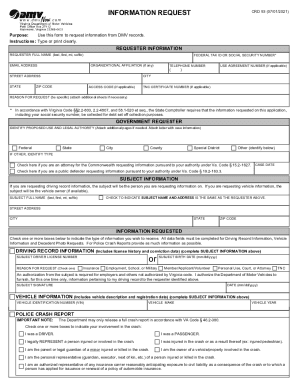
Get Information Request - Virginia
How it works
-

Open form follow the instructions
-

Easily sign the form with your finger
-

Send filled & signed form or save
How to fill out the INFORMATION REQUEST - Virginia online
This guide provides detailed instructions on how to complete the INFORMATION REQUEST - Virginia form online. It aims to assist users in easily navigating the form's components and submitting their requests accurately.
Follow the steps to successfully complete the form.
- Press the ‘Get Form’ button to access the form and open it in your preferred document editor.
- Begin by filling out the Requester Information section. Include your full name, federal tax ID or social security number, organizational affiliation, email address, street address, city, state, and zip code. Make sure all information is typed or printed clearly.
- If applicable, provide your telephone number and any relevant use agreement number. Indicate your reason for the request in the designated field, adding additional sheets if necessary.
- For government requesters, identify the proposed use and legal authority. Check the appropriate box for federal, state, city, county, or special district, and provide additional details if required.
- Next, fill out the Subject Information section. For driving record requests, include the subject's full name. If applicable, check the box to indicate the subject name and address is the same as the requester.
- Complete the Information Requested section by checking the boxes for driving record information, vehicle information, or police crash report, based on your needs. Fill in all required fields related to the requested information.
- If requesting vehicle information, include the vehicle identification number (VIN), make, and year. For police crash reports, provide details such as crash date, time, location, and information about individuals involved in the crash.
- If you are requesting a decedent photo, provide the decedent’s full name, DMV customer number, and birth date. Indicate your relationship to the decedent.
- Carefully read the certification statement and agree to the terms outlined. This section affirms that the information provided will be used solely for the intended purpose and agrees to confidentiality.
- Sign and date the document to certify that all information is true and complete. Finally, review any associated fees for the type of record requested.
- You can save changes, download, print the form, or share it as needed.
Complete your INFORMATION REQUEST online today for efficient access to the information you need.
Get form
Experience a faster way to fill out and sign forms on the web. Access the most extensive library of templates available.
Get This Form Now!
Use professional pre-built templates to fill in and sign documents online faster. Get access to thousands of forms.