Loading
Get Pa Rcpmdj 207
How it works
-

Open form follow the instructions
-

Easily sign the form with your finger
-

Send filled & signed form or save
How to fill out the Pa Rcpmdj 207 online
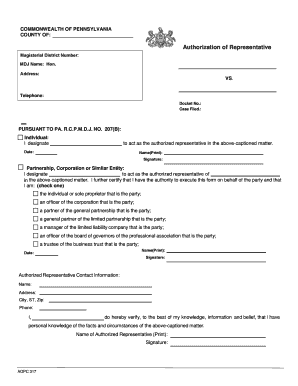
Filling out the Pa Rcpmdj 207 form is an important step for individuals and entities seeking to authorize a representative in legal matters within Pennsylvania. This guide will provide you with clear, step-by-step instructions to ensure that you complete the form accurately and efficiently.
Follow the steps to complete the Pa Rcpmdj 207 form online.
- Click the ‘Get Form’ button to access the Pa Rcpmdj 207 form and open it in your online editor.
- Enter the county where the action is taking place in the designated field. This will help local offices process your request appropriately.
- Fill in the corresponding magisterial district number related to your case. Ensure this number is accurate to avoid issues with your authorization.
- Provide the name of the MDJ (Magisterial District Judge) overseeing your case. This information is crucial for proper identification.
- Input the address of the MDJ, ensuring that it is complete and correct for reliable communication.
- State the telephone number for the MDJ's office. This facilitates contact if any issues arise during processing.
- Fill in the docket number assigned to your case. This unique identification is necessary for accurate record-keeping.
- Indicate the date when the case was filed. This establishes the timeline of your legal matter.
- In the 'Individual' section, clearly print the name of the person you are designating as the authorized representative.
- Date and sign the form to validate it. Ensure that your signature matches the printed name.
- For partnerships, corporations, or similar entities, specify the name of the representative you are designating, and the entity they represent.
- Check the appropriate box to confirm your authority to act on behalf of the entity, specifying your role.
- Provide your printed name, date, and signature before submitting the form.
- Complete the authorized representative contact information section, ensuring that the name, address, city, state, zip code, and phone number are accurate.
- Finalize the form by verifying all information is correct. After ensuring all fields are complete, you can save changes, download, print, or share the form as needed.
Take action today and fill out the Pa Rcpmdj 207 form online to authorize your representative.
Pennsylvania Rule of Civil Procedure 4019(a)(1)(i) provides that “[t]he court may, on motion, make an appropriate order if a party fails to serve answers, sufficient answers, or objections to written interrogatories.”