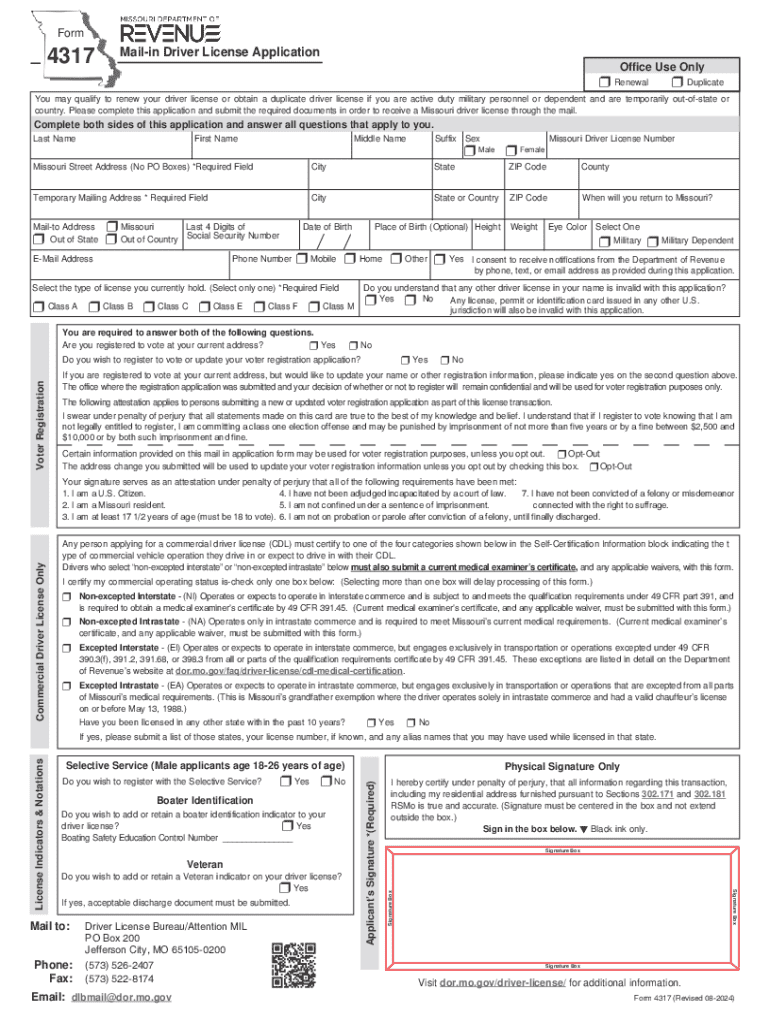
Ou are active duty military personnel or dependent and are temporarily out-of-state or country. Please complete this application and submit the required documents in order to receive a Missouri driver license through the mail. Complete both sides of this application and answer all questions that apply to you. Last Name First Name Middle Name Suffix Sex Missouri Driver License Number r Male r Female Missouri Street Address (No PO Boxes) *Required Field City State ZIP Code County Tempor.
Loading

Open form follow the instructions

Easily sign the form with your finger

Send filled & signed form or save
How to fill out the MO DoR 4317 online
This guide provides a clear and comprehensive overview of how to complete the MO DoR 4317, the mail-in application for renewal or duplicate driver licenses. Follow the instructions carefully to ensure accurate submission and timely processing of your application.
Follow the steps to fill out the MO DoR 4317 online
- Press the ‘Get Form’ button to obtain the MO DoR 4317 and access it in the online editor.
- Fill out your personal information in the designated fields. This includes your last name, first name, middle name, and suffix. Also, indicate your sex and provide your Missouri driver license number.
- Enter your Missouri street address, ensuring it is accurate and does not include a P.O. Box, followed by your city, state, ZIP code, and county information.
- Provide a temporary mailing address if you are currently out of state or country. Include the city, state or country, and ZIP code.
- Indicate the expected return date to Missouri and select your preferred mail-to address, either Missouri, out of state, or out of country.
- Input the last four digits of your social security number, date of birth, phone number, and email address.
- Select the category that pertains to you, indicating if you are military, military dependent, home, or other. Consent to receive notifications through the provided contact methods.
- Choose the type of license you currently hold, confirming that you acknowledge any other licenses in your name will be invalid with this application.
- Answer the questions regarding voter registration honestly, indicating if you wish to register to vote or update your voter registration information.
- Complete the attestation section, affirming the truthfulness of the information provided, and that you are legally eligible to register to vote.
- If applicable, provide additional information for commercial license applicants, including medical information and the type of commercial operation.
- Fill in additional questions regarding your licensing history and declarations pertaining to specific conditions or indicators.
- Review the document thoroughly, making sure all required fields are filled out accurately.
- Complete your payment information for the applicable license fees, ensuring to add any donations if you opted to do so.
- Sign the application physically in the designated box using black ink and follow instructions for submitting the final application.
- After filling out the application, save changes, download the form, and print a copy for your records.
Complete your MO DoR 4317 application online today for a streamlined process.
Experience a faster way to fill out and sign forms on the web. Access the most extensive library of templates available.
Related content
4317PDF Document, Mail-In Driver License Application, 9/6/2019 ... 4821PDF Document...
7, 12/9/2019, Human Trafficking, 9am - 12pm, E2311, $149, Boylan, Sean, X, 09250-...
Sep 27, 2014 - ISN-1058 MODULE, ALLEN-BRADLEY, 1785-LT/B PROCESSOR PLC-5/15...
Get answers to your most pressing questions about US Legal Forms API.
What is class E on drivers license?
CLASS E: Any non-commercial motor vehicles with Gross Vehicle Weight Rating (GVWR) less than 26,001 pounds, including passenger cars, 15 passenger vans including the driver, trucks or recreational vehicles and two or three wheel motor vehicles 50 cc or less, such as mopeds or small scooters.
How do you get a Class E license in Missouri?
To obtain a Class E license, first the applicant must be 18 years of age. Applicants are then required to read and review the Missouri Drivers guide and pass an exam related to the Class E in the book. A vision test is then administered along with a road test (if you do not already have a standard license).
When can you take your permit test in Missouri?
Aside from being at least 16 years of age, having completed all of the required behind-the-wheel driving practice detailed above, and having passed the DMV road test, you will also have to meet all the following requirements: You must have held your Missouri learner's permit for a minimum of 182 days.
How many questions are on the chauffeurs test?
This exam consists of 20 multiple choice questions. You must answer 70% of the questions correctly in order to pass the exam.
How much does it cost to take your permit test in Missouri?
You are eligible for your instruction permit in Missouri starting at age 15, which you can receive by passing a written test, vision test, road sign test, and providing appropriate forms of ID, as well as paying a fee of $3.50.
How many questions are on the Missouri permit test?
The more knowledge you have, the safer you are! The written test consists of 25 multiple-choice questions. You must correctly answer 20 questions to pass the test. All of the test questions come directly from information found in the Missouri Driver guide.
How many questions are on the Missouri drivers test?
The more knowledge you have, the safer you are! The written test consists of 25 multiple-choice questions. You must correctly answer 20 questions to pass the test. All of the test questions come directly from information found in the Missouri Driver guide.
Can you fail parallel parking and still pass in Missouri?
Parallel Parking It is fine to touch the curb, but don't roll over it. Even if you get points taken off for not successfully parallel parking your car, as long as you don't hit a car or the curb too forcefully, you should still pass your test.
What score do you need to pass the drivers test?
32 states have a passing score of 80 percent. Most of these states have 25 questions, which means you must correctly answer 20 questions to pass the exam. Three states (Idaho, Maryland, and Virginia) have a passing score of 85 percent or more.
What is the passing score for driving test in Missouri?
What is a passing score on the Missouri permit test? You must score at least 20 out of 25 questions correctly.
Use professional pre-built templates to fill in and sign documents online faster. Get access to thousands of forms.
If you believe that this page should be taken down, please follow our DMCA take down process here.