Loading
Get Airbnb Receipt Template
How it works
-

Open form follow the instructions
-

Easily sign the form with your finger
-

Send filled & signed form or save
How to fill out the Airbnb Receipt Template online
Completing the Airbnb Receipt Template online can streamline your documentation process and ensure accuracy. This comprehensive guide will help you navigate through each component efficiently and accurately, whether you are a novice or have some experience with document management.
Follow the steps to fill out the Airbnb Receipt Template with ease.
- Click ‘Get Form’ button to obtain the form and open it in the editor.
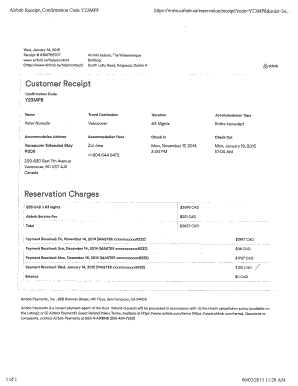
- Locate the 'Confirmation Code' section and enter your unique reservation code (e.g., Y23MP8) in the provided field. This code is essential for verifying the transaction.
- In the 'Name' field, fill in the name of the person who made the booking, ensuring correct spelling and details.
- Provide the 'Travel Destination' to specify the location where the accommodation is located, such as 'Vancouver.'
- Indicate the 'Duration' of the stay by entering the total number of nights reserved, for example, '63 Nights.'
- Select the 'Accommodation Type' by specifying whether it’s an entire home, apartment, or any other option as applicable.
- Fill in the 'Accommodation Address' to provide the precise location of the property where you stayed.
- Complete the 'Accommodation Host' section by entering the name of the host or owner who managed your stay.
- Input the 'Check In' and 'Check Out' dates in the designated fields. Make sure the formats align with the expected standards (e.g., Mon, January 14, 2015).
- In the 'Reservation Charges' section, accurately list the charges for the stay, itemizing costs (e.g., '$58 CAD x 63 nights'). Add up to determine the total before additional fees.
- Include any applicable 'Airbnb Service Fee' in the specified field, ensuring it corresponds to the billed rate.
- Calculate the 'Total' amount by summing up the 'Reservation Charges' and 'Airbnb Service Fee.'
- Document the 'Payments Received' section with all the transactions made regarding the booking, including dates and amounts.
- Finally, review all the fields for accuracy before saving or printing the completed form. You can download it for your records or share it as needed.
Start completing your Airbnb Receipt Template online today to ensure your records are accurate and organized.
How to Write an Airbnb Invoice in Word or PDF Step 1: Open the Airbnb Invoice Section on their Website. ... Step 2: Determine the Airbnb Payment Requirements. ... Step 3: Invoice the Tenant or Airbnb Client. ... Step 4: Identify and List Down the Services.