We use cookies to improve security, personalize the user experience, enhance our marketing activities (including cooperating with our marketing partners) and for other business use.
Click "here" to read our Cookie Policy. By clicking "Accept" you agree to the use of cookies. Read less
Read more
Accept
Loading
Form preview
  • US Legal Forms
  • Form Library
  • More Forms
  • More Multi-State Forms
  • -

Get -

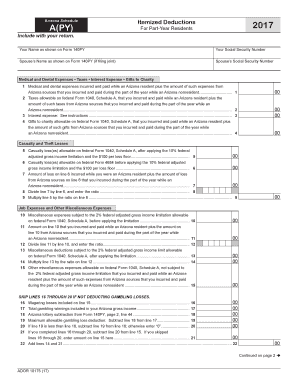
M 140PY (if filing joint) Spouse s Social Security Number Medical and Dental Expenses Taxes Interest Expense Gifts to Charity 1 Medical and dental expenses incurred and paid while an Arizona resident plus the amount of such expenses from Arizona sources that you incurred and paid during the part of the year while an Arizona nonresident............................... 2 Taxes allowable on federal Form 1040, Schedule A, that you incurred and paid while an Arizona resident plus th.

How it works

  1. Open form

    Open form follow the instructions

  2. Easily sign form

    Easily sign the form with your finger

  3. Share form

    Send filled & signed form or save

How to fill out the Arizona Schedule A(PY) online

Filling out the Arizona Schedule A(PY) is essential for part-year residents to report their itemized deductions accurately. This guide provides clear, step-by-step instructions to help users complete the form with confidence.

Follow the steps to successfully complete your form online.

  1. Click ‘Get Form’ button to access the Arizona Schedule A(PY) and open it for editing.
  2. Enter your name as it appears on Form 140PY and include your Social Security Number. If you are filing jointly, also provide your spouse's name and their Social Security Number.
  3. Fill in the required fields for medical and dental expenses. This includes expenses incurred while you were an Arizona resident, as well as those from Arizona sources while a nonresident.
  4. Complete the section for taxes, ensuring to report the allowable taxes you paid as an Arizona resident and from Arizona sources during your nonresident period.
  5. Provide details about any interest expenses, following the instructions provided on the form.
  6. Document gifts to charity that were allowable on federal Schedule A, noting both your Arizona resident and nonresident contributions.
  7. If you have any casualty losses, complete those lines, ensuring to calculate any limitations as specified.
  8. For miscellaneous expenses, detail any job-related costs along with gambling losses, if applicable, skipping those sections if not deductible.
  9. Add all relevant lines to find your total itemized deductions and proceed with the applicable calculations depending on your federal adjusted gross income.
  10. Review all the entered information for accuracy before saving changes. You can then download, print, or share the completed form.

Complete your Arizona Schedule A(PY) online today to ensure accurate tax reporting.

Get form

Experience a faster way to fill out and sign forms on the web. Access the most extensive library of templates available.
Get form

Related content

NC DOJ - Home - Attorney General Josh Stein
Attorney General Josh Stein. Find North Carolina's Department of Justice information...
Learn more
Notre Dame College: Homepage
Notre Dame College is a liberal arts college located in Cleveland, OH. An NCAA Division II...
Learn more
Armiusate.it, Armi Usate, Armi Nuove, vendita...
Il portale italiano delle armi usate, vendita e acquisto tra privati e armerie.
Learn more

Related links form

CONSENT TO MARRY AND APPROVAL OF APPLICATION ... - Co Stearns Mn Plat Resolution.doc - Tulsacounty BEREAVEMENT BENEFIT CLAIM FORM ... - Tompkins County - Tompkins-co Road Maintenance Agreement - Tuscarawas County

Questions & Answers

Get answers to your most pressing questions about US Legal Forms API.

Contact support

The hyphen ‐ is a punctuation mark used to join words and to separate syllables of a single word. The use of hyphens is called hyphenation. Son-in-law is an example of a hyphenated word.

A hyphen joins two or more words together while a dash separates words into parenthetical statements. The two are sometimes confused because they look so similar, but their usage is different. Hyphens are not separated by spaces, while a dash has a space on either side.

Using hyphens with prefixes Hyphenate prefixes before proper nouns. ... Use a hyphen with most words that begin with the prefix self-. ... Use a hyphen with words that begin with the prefix ex-. ... Use a hyphen with most words that begin with the prefix non-. ... Use a hyphen when the prefix ends in the same letter the word begins.

A hyphen ( - ) is used to link parts of a compound word.

The Hyphen Use a hyphen at the end of a line to divide a word where there is not enough space for the whole word. ... Use a hyphen to indicate a word spelled out letter by letter. ... Use a hyphen to join two or more words to form compound adjectives that precede a noun. ... Use a hyphen to avoid awkward doubling of vowels.

Summary: Use a hyphen to join two or more words serving as a single adjective before a noun: ... Use a hyphen with compound numbers: ... Use a hyphen to avoid confusion or an awkward combination of letters:

The dash (—), also called the em dash, is the long horizontal bar, much longer than a hyphen. Few keyboards have a dash, but a word processor can usually produce one in one way or another. If your keyboard can't produce a dash, you will have to resort to a hyphen as a stand-in.

A hyphen joins two or more words together while a dash separates words into parenthetical statements. The two are sometimes confused because they look so similar, but their usage is different. Hyphens are not separated by spaces, while a dash has a space on either side.

Use a hyphen at the end of a line to divide a word where there is not enough space for the whole word. Follow the rules for dividing words correctly. Divide a word between syllables. Never divide a one-syllable word.

What is a hyphen? A hyphen (-) is a punctuation mark that's used to join words or parts of words. It's not interchangeable with other types of dashes. Use a hyphen in a compound modifier when the modifier comes before the word it's modifying.

Get This Form Now!

Use professional pre-built templates to fill in and sign documents online faster. Get access to thousands of forms.
Get form
If you believe that this page should be taken down, please follow our DMCA take down processhere.

Industry-leading security and compliance

US Legal Forms protects your data by complying with industry-specific security standards.
  • In businnes since 1997
    25+ years providing professional legal documents.
  • Accredited business
    Guarantees that a business meets BBB accreditation standards in the US and Canada.
  • Secured by Braintree
    Validated Level 1 PCI DSS compliant payment gateway that accepts most major credit and debit card brands from across the globe.
Get -
Get form
Form Packages
Adoption
Bankruptcy
Contractors
Divorce
Home Sales
Employment
Identity Theft
Incorporation
Landlord Tenant
Living Trust
Name Change
Personal Planning
Small Business
Wills & Estates
Packages A-Z
Form Categories
Affidavits
Bankruptcy
Bill of Sale
Corporate - LLC
Divorce
Employment
Identity Theft
Internet Technology
Landlord Tenant
Living Wills
Name Change
Power of Attorney
Real Estate
Small Estates
Wills
All Forms
Forms A-Z
Form Library
Customer Service
Terms of Service
Privacy Notice
Legal Hub
Content Takedown Policy
Bug Bounty Program
About Us
Help Portal
Legal Resources
Blog
Affiliates
Contact Us
Delete My Account
Site Map
Industries
Forms in Spanish
Localized Forms
State-specific Forms
Forms Kit
Legal Guides
Real Estate Handbook
All Guides
Prepared for You
Notarize
Incorporation services
Our Customers
For Consumers
For Small Business
For Attorneys
Our Sites
US Legal Forms
USLegal
FormsPass
pdfFiller
signNow
airSlate WorkFlow
DocHub
Instapage
Social Media
Call us now toll free:
+1 833 426 79 33
As seen in:
  • USA Today logo picture
  • CBC News logo picture
  • LA Times logo picture
  • The Washington Post logo picture
  • AP logo picture
  • Forbes logo picture
© Copyright 1997-2025
airSlate Legal Forms, Inc.
3720 Flowood Dr, Flowood, Mississippi 39232
Form Packages
Adoption
Bankruptcy
Contractors
Divorce
Home Sales
Employment
Identity Theft
Incorporation
Landlord Tenant
Living Trust
Name Change
Personal Planning
Small Business
Wills & Estates
Packages A-Z
Form Categories
Affidavits
Bankruptcy
Bill of Sale
Corporate - LLC
Divorce
Employment
Identity Theft
Internet Technology
Landlord Tenant
Living Wills
Name Change
Power of Attorney
Real Estate
Small Estates
Wills
All Forms
Forms A-Z
Form Library
Customer Service
Terms of Service
Privacy Notice
Legal Hub
Content Takedown Policy
Bug Bounty Program
About Us
Help Portal
Legal Resources
Blog
Affiliates
Contact Us
Delete My Account
Site Map
Industries
Forms in Spanish
Localized Forms
State-specific Forms
Forms Kit
Legal Guides
Real Estate Handbook
All Guides
Prepared for You
Notarize
Incorporation services
Our Customers
For Consumers
For Small Business
For Attorneys
Our Sites
US Legal Forms
USLegal
FormsPass
pdfFiller
signNow
airSlate WorkFlow
DocHub
Instapage
Social Media
Call us now toll free:
+1 833 426 79 33
As seen in:
  • USA Today logo picture
  • CBC News logo picture
  • LA Times logo picture
  • The Washington Post logo picture
  • AP logo picture
  • Forbes logo picture
© Copyright 1997-2025
airSlate Legal Forms, Inc.
3720 Flowood Dr, Flowood, Mississippi 39232