Loading
Form preview
  • US Legal Forms
  • Other Templates
  • Other Forms
  • Florida Other Forms
  • Fl Ocoee Permit Application 2004

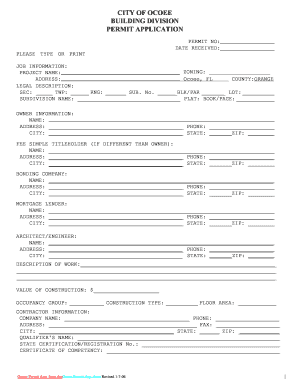
Get Fl Ocoee Permit Application 2004-2026

RANGE LEGAL DESCRIPTION: SEC: _____ TWP: _____ RNG: ______ SUB. No. ______BLK/PAR _______ LOT: SUBDIVISION NAME: PLAT: BOOK/PAGE: OWNER INFORMATION: NAME: ADDRESS: __________________________________________ PHONE: ____________________ CITY: __________________________________________ STATE: _______ZIP: ________ FEE SIMPLE TITLEHOLDER (IF DIFFERENT THAN OWNER): NAME: ______________________________________________________________________ ADDRESS: __________________________________________ PHONE: __.

How it works

  1. Open form

    Open form follow the instructions

  2. Easily sign form

    Easily sign the form with your finger

  3. Share form

    Send filled & signed form or save

How to fill out the FL Ocoee Permit Application online

Completing the FL Ocoee Permit Application online can seem daunting, but with clear guidance, you can successfully navigate the process. This guide will take you through each section of the application, ensuring you provide all necessary information accurately.

Follow the steps to complete your application efficiently.

  1. Press the ‘Get Form’ button to access the application form and open it in your preferred document editor.
  2. Begin filling in the job information section. Enter the zoning, project name, address, county (Orange), legal description, and subdivision details as required.
  3. Next, provide the owner information. Include the owner's name, address, phone number, city, state, and zip code. If applicable, fill out the fee simple titleholder section with the corresponding details.
  4. Complete the bonding company and mortgage lender sections with the relevant names, addresses, and contact information.
  5. In the architect/engineer section, fill out the name, address, phone number, city, state, and zip code as appropriate.
  6. Describe the work to be performed in the designated section. Ensure your description is clear and comprehensive. Specify the total value of construction, occupancy group, construction type, and floor area.
  7. Fill in the contractor information section with the company name, phone number, address, state, and zip code. Include the name of the qualifier and their certification or registration number.
  8. For subcontractor information, list the names and addresses of various contractors (e.g., electrical, plumbing, roofing) as applicable.
  9. Review and complete the applicant's affidavit. Make sure you understand the implications of the affidavit and provide your signature, along with the contractor's signature if necessary.
  10. Finally, check the entire application for accuracy and completeness. You can then save your changes, download the completed form, print it, or share it as required.

Ensure you submit your completed documents online to avoid delays in your permit approval process.

Get form

Experience a faster way to fill out and sign forms on the web. Access the most extensive library of templates available.
Get form

Related content

Permitting Forms & Documents - City of Orlando
View frequently used Permitting forms and documents including applications for specific...
Learn more
Bldg-Permit-Application.pdf - Orlando
... DEPARTMENT. 3528 N. Perseus Loop, Orlando FL 32816-3500, Phone 407-823-5323. BUILDING...
Learn more
INSTRUCTIONS FOR COMPLETING THE FLORIDA ...
A Long Form report (HSMV 90010S) in its entirety must include a Narrative/Diagram when the...
Learn more

Related links form

Testamentary Trust Form 2020 Uniqlo Application Form 2020 Ca2 Form 2020 College Of Business Administration At Cal Poly Pomona - Csupomona

Questions & Answers

Get answers to your most pressing questions about US Legal Forms API.

Contact support

Constructing without a permit in Florida can result in significant penalties. Fines can accumulate based on the severity and duration of the violation. Additionally, if cited, you may be required to cease construction and remedy the situation, which could involve obtaining a FL Ocoee Permit Application retroactively. To avoid these penalties, it’s always wise to check your local requirements before beginning any construction project.

The approval time for a building permit in Florida varies, but typically, you can expect the process to range from several days to several weeks for a FL Ocoee Permit Application. Delays can occur due to incomplete documentation or required revisions. To minimize wait times, ensure that all forms are filled out correctly and that your application includes all necessary information. Following up regularly with local officials can also help speed things along.

Building without a permit in Florida can lead to serious consequences. If authorities discover unauthorized construction, you may face fines as well as orders to halt work and potentially remove what has been built. Additionally, your FL Ocoee Permit Application may become more complicated, as unauthorized work can affect future permits. Therefore, it’s crucial to always secure your permits before starting any construction.

The timeline for receiving a building permit in Florida can vary based on several factors, including complexity of your project and local government processes. On average, for a FL Ocoee Permit Application, you can expect the review to take anywhere from a few days to several weeks. It's important to submit all required materials upfront to avoid delays. Maintaining communication with local officials can also expedite the process.

The permitting process is a critical step when you prepare to build in Florida. First, you need to submit your FL Ocoee Permit Application along with required documents, such as project plans and site surveys. After that, city officials will review your submission, and may conduct inspections to ensure compliance with local regulations. Once everything meets the standards, you will receive your permit, allowing you to proceed with your construction.

In Florida, there are specific structures that you can build without a permit, such as small sheds under 120 square feet, certain fences, and playhouses. However, even these exemptions depend on local regulations. It is always wise to check with your local authority to confirm what falls under the guidelines before proceeding with your project and the FL Ocoee Permit Application.

Yes, you can sell a house with unpermitted work in Florida, but this could complicate the sale. Potential buyers may demand repairs or legal clarification regarding the unpermitted work. Furthermore, disclosing unpermitted work is important to avoid future liabilities, making a thorough examination of your property essential before filing your FL Ocoee Permit Application.

In most cases, you do need a permit to install pavers in your backyard in Florida. Local building codes often require permits for hardscape installations to ensure adherence to safety and zoning regulations. It’s wise to check with your local authorities or use the FL Ocoee Permit Application to determine specific requirements for your area.

Mechanical Permit Fees TypeResidential FeesStand alone- New residential - Mechanical$65Mechanical (General) For all mechanical-related activities not addressed in Appendix I$77 (maximum one inspection)HVAC equal changeouts$77 (maximum one inspection)Multi-family - Mechanical$77 plus $35 per unit2 more rows

Apply for permits through our online permitting portal, HillsGovHub. Visit HillsGovHub and search for your record to check the status of your permit. You must be logged in to view select details and use the My Records function. View the user guide for assistance.

Get This Form Now!

Use professional pre-built templates to fill in and sign documents online faster. Get access to thousands of forms.
Get form
If you believe that this page should be taken down, please follow our DMCA take down processhere.
Get FL Ocoee Permit Application
Get form
  • Adoption
  • Bankruptcy
  • Contractors
  • Divorce
  • Home Sales
  • Employment
  • Identity Theft
  • Incorporation
  • Landlord Tenant
  • Living Trust
  • Name Change
  • Personal Planning
  • Small Business
  • Wills & Estates
  • Packages A-Z
  • Affidavits
  • Bankruptcy
  • Bill of Sale
  • Corporate - LLC
  • Divorce
  • Employment
  • Identity Theft
  • Internet Technology
  • Landlord Tenant
  • Living Wills
  • Name Change
  • Power of Attorney
  • Real Estate
  • Small Estates
  • Wills
  • All Forms
  • Forms A-Z
  • Other Templates
  • Legal Hub
  • About Us
  • Help Portal
  • Legal Resources
  • Blog
  • Affiliates
  • Contact Us
  • Delete My Account
  • Site Map
  • Industries
  • Forms in Spanish
  • Localized Forms
  • State-specific Forms
  • Forms Kit
  • Real Estate Handbook
  • All Guides
  • Notarize
  • Incorporation services
  • For Consumers
  • For Small Business
  • For Attorneys
  • USLegal
  • FormsPass
  • pdfFiller
  • signNow
  • altaFlow
  • DocHub
  • Instapage
Form Packages
  • Adoption
  • Bankruptcy
  • Contractors
  • Divorce
  • Home Sales
  • Employment
  • Identity Theft
  • Incorporation
  • Landlord Tenant
  • Living Trust
  • Name Change
  • Personal Planning
  • Small Business
  • Wills & Estates
  • Packages A-Z
Form Categories
  • Affidavits
  • Bankruptcy
  • Bill of Sale
  • Corporate - LLC
  • Divorce
  • Employment
  • Identity Theft
  • Internet Technology
  • Landlord Tenant
  • Living Wills
  • Name Change
  • Power of Attorney
  • Real Estate
  • Small Estates
  • Wills
  • All Forms
  • Forms A-Z
  • Other Templates
Customer Service
  • Legal Hub
  • About Us
  • Help Portal
  • Legal Resources
  • Blog
  • Affiliates
  • Contact Us
  • Delete My Account
  • Site Map
  • Industries
  • Forms in Spanish
  • Localized Forms
  • State-specific Forms
  • Forms Kit
Legal Guides
  • Real Estate Handbook
  • All Guides
Prepared for you
  • Notarize
  • Incorporation services
Our Customers
  • For Consumers
  • For Small Business
  • For Attorneys
Our Sites
  • USLegal
  • FormsPass
  • pdfFiller
  • signNow
  • altaFlow
  • DocHub
  • Instapage
Social Media
Call us now toll free:
+1 833 426 79 33
As seen in:
© Copyright 1999-2026 airSlate Legal Forms, Inc. 17 Station Street, Suite 303, Brookline, MA 02445
  • Your Privacy Choices
  • Terms of Service
  • Privacy Notice
  • Content Takedown Policy
  • Bug Bounty Program