Telephone expenses, electricity expenses, legal fees, audit fees etc. Any input tax directly attributable to taxable supplies should be deducted in total and any Input Tax directly attributed to exempt supplies should not be deducted. If input tax attributable to exempt supplies is less than 5% of total input tax, then all the tax can be deducted. CHEQUE NO. PAY-IN-SLIP COUNTERFOIL BANK BRANCH SHS. TOTAL CHEQUE NO BANK BRANCH SHS TOTAL CASH NOTES 1000 500 200 100 50 20 COINS 2.
Loading

Open form follow the instructions

Easily sign the form with your finger

Send filled & signed form or save
How to fill out the KE VAT 3 online
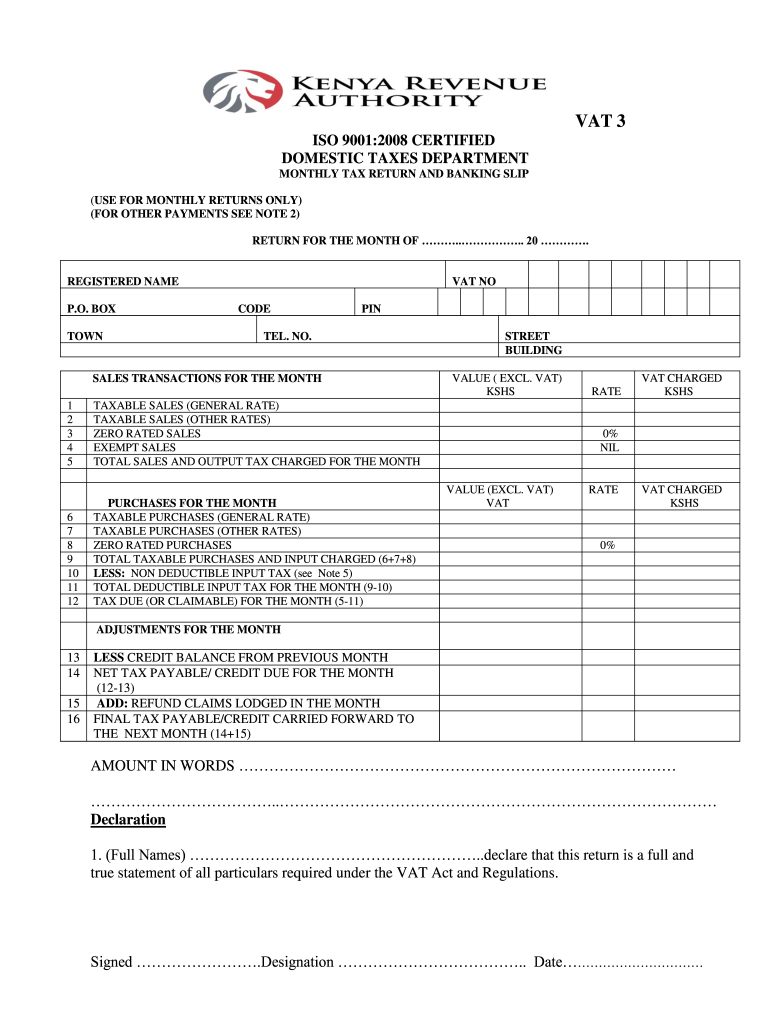
Filling out the KE VAT 3 form correctly is essential for making accurate monthly tax returns. This guide provides clear and supportive instructions designed to help users complete the form online, ensuring compliance with tax regulations.
Follow the steps to fill out the KE VAT 3 form online
- Click ‘Get Form’ button to obtain the form and open it in the document editor.
- Enter your registered name, P.O. box number, town, VAT number, PIN, and telephone number in the designated fields.
- Fill out the sales transactions for the month by entering values in the respective fields labeled 1 through 12. Provide the values excluding VAT and ensure you categorize them appropriately.
- In the section for taxable sales, indicate the amounts for taxable sales at the general rate, other rates, zero-rated sales, and exempt sales. Calculate and enter the total sales and output tax charged for the month.
- Next, list your purchases for the month. Fill in the taxable purchases at the general rate, other rates, and zero-rated purchases in the appropriate fields.
- Calculate the total taxable purchases and input tax charged by summing the values entered and deducting any non-deductible input tax.
- Determine your total deductible input tax for the month, and then calculate the tax due or claimable for the month by following the instructions specified.
- If applicable, include adjustments for the month, including any carried over credit balance from the previous month.
- Calculate the net tax payable or credit due for the month and add any refund claims lodged during the month.
- Finally, fill out the declaration section with your full name, designation, and date. Ensure the return is signed by the appropriate authority such as a director or principal officer.
- Review all the filled sections carefully for accuracy and completeness.
- Save changes, download the completed form, and print a copy for your records.
Complete your KE VAT 3 form online today to ensure timely and accurate tax submissions.
Experience a faster way to fill out and sign forms on the web. Access the most extensive library of templates available.
Related content
by S Qian · 2019 — Sarah Qian , Joel Smith , Nilika Wijeratne , Dev Kevat ... 3...
VAT is discussed in detail under chapter 6 herein.. iii. ... TAXATION OF INCOMES OF...
1 Income tax · 2 Taxable income · 3 Value Added Tax. 3.1 Exempt goods and services · 4...
Get answers to your most pressing questions about US Legal Forms API.
How do I file a VAT return in Ireland?
How do I file my VAT return? VAT Returns can be filed online via your ROS account. If you have not already set up your ROS account, you should register for ROS as soon as possible as it takes about one week to complete. Separate ROS certificates are used for your personal and company logins.
What is E1 on VAT return?
E1 – intra-European Union (EU) supplies of goods This is the total value of goods sent to customers in other EU countries.
What is a VAT return for a small business?
The VAT return is a summary of your earnings (which includes the VAT you've charged for your goods and services) plus your expenses (which includes the VAT you've paid for goods and services). The difference between these amounts will determine how much you need to pay or claim in your quarterly VAT return.
What is a VAT 3 return form?
The VAT 3 return records the Value-Added Tax (VAT) payable, or reclaimable, by you in your taxable period.
When must VAT returns be submitted?
A vendor must submit VAT returns and make payment (or claim a refund) of VAT on or before the 25th day or the last business day of the month (if registered for eFiling) following the month in which the vendor's tax period ends.
What are the types of VAT returns?
Three types of returns are prescribed under VAT namely, Monthly, Quarterly and Yearly. A registered dealer has to file a VAT or CST return even though it is nil return.
What is a VAT 3 form?
The VAT3 return records the VAT payable, or reclaimable, by you in your taxable period. VAT repayments are made directly to an account in a financial institution. However, the Collector-General may withhold your repayments if you have outstanding tax returns.
Use professional pre-built templates to fill in and sign documents online faster. Get access to thousands of forms.
If you believe that this page should be taken down, please follow our DMCA take down process here.