Loading
Get Sd Tb Risk Assessment Worksheet 2021-2026
How it works
-

Open form follow the instructions
-

Easily sign the form with your finger
-

Send filled & signed form or save
How to fill out the SD TB Risk Assessment Worksheet online
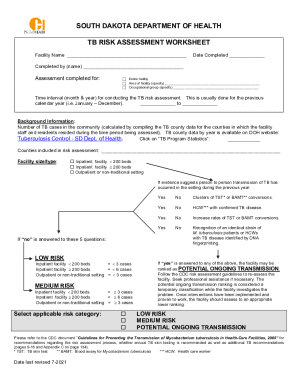
The SD TB Risk Assessment Worksheet is an essential document used to assess the tuberculosis risk levels in various healthcare settings. This guide provides step-by-step instructions to help users complete this worksheet online accurately and efficiently.
Follow the steps to fill out the SD TB Risk Assessment Worksheet online.
- Press the ‘Get Form’ button to obtain the SD TB Risk Assessment Worksheet and open it in your online editing tool.
- Enter the facility name in the designated field at the top of the form.
- Record the date of completion in the appropriate section.
- In the section titled 'Completed by (name)', provide the name of the individual completing the assessment.
- Indicate whether the assessment is for the entire facility, a specific area, or an occupational group by checking the appropriate box and specifying if necessary.
- Fill in the time interval for the TB risk assessment, typically covering the previous calendar year.
- Gather background information, including the number of TB cases in the community and the counties included in the assessment.
- Select the type and size of your facility by checking the relevant box.
- Review the section regarding person-to-person transmission of TB in your facility and respond to the provided questions. Mark 'yes' or 'no' as applicable.
- Based on your answers, select the applicable risk category for your facility.
- Consult the CDC guidelines mentioned in the worksheet to determine if additional actions are required based on the risk level identified.
- After completing the form, save your changes and consider downloading, printing, or sharing the completed document as necessary.
Take the next step in protecting your community by completing the SD TB Risk Assessment Worksheet online.