Loading
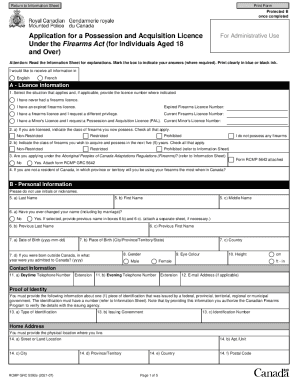
Get Information Sheet: Application For A Possession And Acquisition Licence Under
How it works
-

Open form follow the instructions
-

Easily sign the form with your finger
-

Send filled & signed form or save
How to fill out the information sheet: application for a possession and acquisition licence under online
Filling out the information sheet for a possession and acquisition licence can seem daunting, especially for those unfamiliar with legal forms. This guide provides clear, step-by-step instructions to help users navigate the application process effectively and confidently, ensuring all necessary information is properly submitted.
Follow the steps to complete your application with ease.
- Click ‘Get Form’ button to obtain the form and open it in the editor.
- Read the introductory information carefully, including the fee structure and eligibility requirements for applying. Pay close attention to the notes regarding current firearms possession and safety training courses.
- In Section A, provide your licence information by selecting the appropriate situation that applies to you. If applicable, enter your previous licence number.
- Fill out Section B with your personal information. Ensure your full legal name is printed clearly, avoiding initials or nicknames.
- In Section C, answer all questions regarding your personal history thoroughly. If you answer 'yes' to any questions, be ready to provide additional information.
- Complete Section D, outlining your current conjugal status. It is crucial to provide accurate details about your current and former partners as required.
- In Section E and F, provide necessary information about your current partner and any previous partners from the past two years, along with their signatures where applicable.
- Proceed to Section G regarding safety training certification. Indicate any courses completed, attaching proof if required.
- In Section H, list references who have known you for at least three years. Ensure they are not your current conjugal partner.
- Provide your photo in Section I, including a sign-off from your guarantor confirming your identity in the photograph.
- Submit the required fee as indicated in Section J, selecting your method of payment. Ensure to check the fee structure for accuracy according to the type of licence applied for.
- Sign and date your application in Section K, confirming the truthfulness of your provided information.
- Once all sections are complete, review the form for accuracy, use the checklist provided to ensure everything is included, and then submit it as instructed.
Complete your application for a possession and acquisition licence online today to ensure a smooth process!
Get form
Experience a faster way to fill out and sign forms on the web. Access the most extensive library of templates available.
Ontarians applying for a Possession and Acquisition Licence (PAL) for the first time are required to successfully complete the Canadian Firearms Safety Course (CFSC) or the Canadian Restricted Firearms Safety Course (CRFSC).
Get This Form Now!
Use professional pre-built templates to fill in and sign documents online faster. Get access to thousands of forms.