Loading
Form preview
  • US Legal Forms
  • Form Library
  • More Forms
  • More Multi-State Forms
  • Cartoon Me

Get Cartoon Me

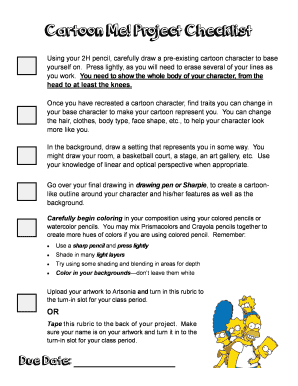
Cartoon Me! Project Checklist Using your 2H pencil, carefully draw a preexisting cartoon character to base yourself on. Press lightly, as you will need to erase several of your lines as you work.

How it works

  1. Open form

    Open form follow the instructions

  2. Easily sign form

    Easily sign the form with your finger

  3. Share form

    Send filled & signed form or save

How to fill out the Cartoon Me online

This guide provides a clear, step-by-step approach to filling out the Cartoon Me form. Whether you are an experienced user or a beginner, you will find helpful instructions tailored to ensure your success in this artistic project.

Follow the steps to successfully complete your Cartoon Me project.

  1. Press the ‘Get Form’ button to access the Cartoon Me document and open it for editing.
  2. Begin by using a 2H pencil to lightly outline a pre-existing cartoon character. Ensure the entire body is depicted, from the head to at least the knees, keeping in mind that you may need to erase lines as you refine your work.
  3. Modify traits of the base character to reflect your likeness. You may change aspects such as hair, clothing, body type, and face shape to make the cartoon character uniquely yours.
  4. Design a background that represents you personally, whether it is your room, a sport court, a stage, or an art gallery. Utilize linear and optical perspective to enhance your background.
  5. Once your drawing is complete, use a drawing pen or Sharpie to outline your character and their features, as well as the background, giving it a cartoon-like appearance.
  6. Color in your illustration with colored pencils or watercolor pencils. Mix different brands if you wish to create a broader range of colors. Keep the following tips in mind: use a sharp pencil, apply light layers, incorporate shading and blending for depth, and remember to color in the background.
  7. Finally, save your artwork. You can upload it as required, or if you are submitting a physical project, ensure you tape any necessary rubrics to the back and clearly label your name. Make sure to submit it at the correct slot for your class.

Complete your Cartoon Me project online today and unleash your creativity!

Get form

Experience a faster way to fill out and sign forms on the web. Access the most extensive library of templates available.
Get form

Related content

"How can you call me intolerant? Some of my best...
1 drawing on layered paper board : ink over pencil with overlay. | Cartoon shows a German...
Learn more
A Cartoon About Me - Scratch Studio
A Cartoon About Me. Take some photos of yourself and save them to the desktop. Using these...
Learn more
My Life Me - Wikipedia
My Life Me is a short-lived French Canadian animated television series created by JC...
Learn more

Related links form

SITE DEVELOPMENT PERMIT APPLICATION City Of Woodinville ... Initial Site Meeting Information - Vancouver School Board Prerequisite Experience For A Principal's Certificate - Office Of ... - K12 Wa White Earth Reservation Building Permit - White Earth Nation

Questions & Answers

Get answers to your most pressing questions about US Legal Forms API.

Contact support

Add cartoon filters to your photos with a single click. Upload Your Photo. Open your image in our Photo Editor. Add a Cartoon Effect. Apply an effect from our online Cartoonizer. Save Your Cartoon Photo. Save your photo and share it on Facebook, Instagram, and more!

This is the app you have been looking for!!! it is all completely FREE!!!

The best alternatives to Toonme.com by Photo Lab are Sticker Mule, Kapwing, and Toonify. If these 3 options don't work for you, we've listed over 20 alternatives below.

Voila AI Artist is a photo editing app for iOS and Android that uses artificial intelligence to turn your pictures into a Renaissance era painting, Pixar inspired cartoon and more. It's the cartoon that has everyone going wild and the feature that has propelled Voila to the top of the App Store charts.

There are many free apps to choose from, but the best free app to make Magic Avatars is PhotoDirector. It doesn't have distracting ads, its effects are applied quickly, and it allows you to keep updating your cartoons over time.

ToonMe: An Easy-to-Use App to Cartoonize Yourself This app is available on iOS and Android and can turn your photo into vector art quickly and simply.

Media.io is a free single-click Cartoonizer that allows you to turn your pictures into cartoons within seconds. Whether you want to cartoon yourself, your pet, or a fantastic thing you captured, Media.io cartoon photo maker has you covered.

Get This Form Now!

Use professional pre-built templates to fill in and sign documents online faster. Get access to thousands of forms.
Get form
If you believe that this page should be taken down, please follow our DMCA take down processhere.

Industry-leading security and compliance

US Legal Forms protects your data by complying with industry-specific security standards.
  • In businnes since 1997
    25+ years providing professional legal documents.
  • Accredited business
    Guarantees that a business meets BBB accreditation standards in the US and Canada.
  • Secured by Braintree
    Validated Level 1 PCI DSS compliant payment gateway that accepts most major credit and debit card brands from across the globe.
Get Cartoon Me
Get form
  • Adoption
  • Bankruptcy
  • Contractors
  • Divorce
  • Home Sales
  • Employment
  • Identity Theft
  • Incorporation
  • Landlord Tenant
  • Living Trust
  • Name Change
  • Personal Planning
  • Small Business
  • Wills & Estates
  • Packages A-Z
  • Affidavits
  • Bankruptcy
  • Bill of Sale
  • Corporate - LLC
  • Divorce
  • Employment
  • Identity Theft
  • Internet Technology
  • Landlord Tenant
  • Living Wills
  • Name Change
  • Power of Attorney
  • Real Estate
  • Small Estates
  • Wills
  • All Forms
  • Forms A-Z
  • Form Library
  • Legal Hub
  • About Us
  • Help Portal
  • Legal Resources
  • Blog
  • Affiliates
  • Contact Us
  • Delete My Account
  • Site Map
  • Industries
  • Forms in Spanish
  • Localized Forms
  • State-specific Forms
  • Forms Kit
  • Real Estate Handbook
  • All Guides
  • Notarize
  • Incorporation services
  • For Consumers
  • For Small Business
  • For Attorneys
  • USLegal
  • FormsPass
  • pdfFiller
  • signNow
  • altaFlow
  • DocHub
  • Instapage
Form Packages
  • Adoption
  • Bankruptcy
  • Contractors
  • Divorce
  • Home Sales
  • Employment
  • Identity Theft
  • Incorporation
  • Landlord Tenant
  • Living Trust
  • Name Change
  • Personal Planning
  • Small Business
  • Wills & Estates
  • Packages A-Z
Form Categories
  • Affidavits
  • Bankruptcy
  • Bill of Sale
  • Corporate - LLC
  • Divorce
  • Employment
  • Identity Theft
  • Internet Technology
  • Landlord Tenant
  • Living Wills
  • Name Change
  • Power of Attorney
  • Real Estate
  • Small Estates
  • Wills
  • All Forms
  • Forms A-Z
  • Form Library
Customer Service
  • Legal Hub
  • About Us
  • Help Portal
  • Legal Resources
  • Blog
  • Affiliates
  • Contact Us
  • Delete My Account
  • Site Map
  • Industries
  • Forms in Spanish
  • Localized Forms
  • State-specific Forms
  • Forms Kit
Legal Guides
  • Real Estate Handbook
  • All Guides
Prepared for you
  • Notarize
  • Incorporation services
Our Customers
  • For Consumers
  • For Small Business
  • For Attorneys
Our Sites
  • USLegal
  • FormsPass
  • pdfFiller
  • signNow
  • altaFlow
  • DocHub
  • Instapage
Social Media
Call us now toll free:
+1 833 426 79 33
As seen in:
© Copyright 1999-2026 airSlate Legal Forms, Inc. 3720 Flowood Dr, Flowood, Mississippi 39232
  • Your Privacy Choices
  • Terms of Service
  • Privacy Notice
  • Content Takedown Policy
  • Bug Bounty Program