Loading
Get Worker Training Record
How it works
-

Open form follow the instructions
-

Easily sign the form with your finger
-

Send filled & signed form or save
How to fill out the Worker Training Record online
Filling out the Worker Training Record online is essential for documenting employee training in agricultural practices. This guide provides a clear and concise overview of how to accurately complete each section of the form.
Follow the steps to complete your Worker Training Record online.
- Press the ‘Get Form’ button to access the Worker Training Record and open it in your browser.
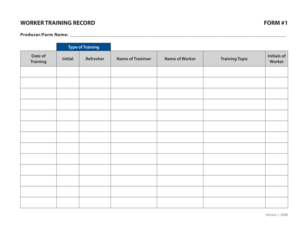
- In the first field, enter the producer or farm name. This identifies the location or organization providing the training.
- Next, indicate the type of training by selecting either ‘Initial’ or ‘Refresher’ from the provided options. This indicates when the training occurred.
- For the date of training, input the specific date when the training was conducted. Ensure this reflects when the worker received their training.
- In the ‘Name of Trainer’ field, enter the full name of the person who conducted the training session. This ensures accountability and record-keeping.
- Follow with the ‘Name of Worker’ field. Enter the full name of the worker who received the training to associate the record uniquely to them.
- Then, specify the training topic by describing the subject matter covered during the session. This helps in categorizing the training and aids future reference.
- Lastly, the ‘Initials of Worker’ field requires the worker to sign off on their training completion by inputting their initials.
- After completing all required fields, save the changes to your form. You may then download, print, or share the final document as necessary.
Start filling out your Worker Training Record online today to ensure accurate documentation of your training efforts.
What should be included in training records? Training records are proof that certain individuals attended specific classes, read required policies and procedures (e.g., SOPs, work instructions). The training topic, the instructor's name, the date, and the trainee's name are typically tracked and recorded.