Loading
Get Ma Security Deposit Receipt
How it works
-

Open form follow the instructions
-

Easily sign the form with your finger
-

Send filled & signed form or save
How to fill out the MA Security Deposit Receipt online
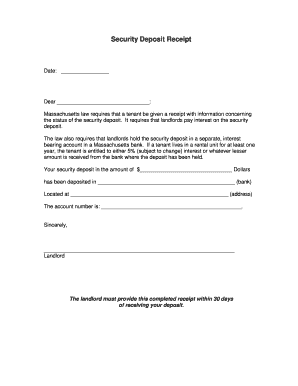
The Massachusetts Security Deposit Receipt is a legal document that outlines the details of a tenant's security deposit. This guide will provide you with clear, step-by-step instructions on how to fill out this important form online, ensuring compliance with Massachusetts law.
Follow the steps to complete the MA Security Deposit Receipt
- Click ‘Get Form’ button to obtain the form and open it in the editor.
- In the date field, enter the current date when completing the receipt.
- In the ‘Dear’ field, input the name of the tenant to whom the receipt is addressed.
- Fill in the amount of the security deposit in the appropriate field, ensuring you write the full amount in dollars.
- Specify the bank where the security deposit is held in the designated space.
- Complete the address of the bank in the next available field.
- Enter the account number where the security deposit has been placed.
- Lastly, sign the form with your name as the landlord in the space provided.
- Review all the entered information for accuracy and completeness before finalizing.
- Once you have verified all details, you may save changes, download, print, or share the completed form as needed.
Complete the MA Security Deposit Receipt online today to ensure a smooth rental process.
To make a security deposit receipt, start by including the transaction date, the amount, and the purpose of the deposit. You can use available templates for a MA Security Deposit Receipt to ensure you cover all necessary details, including spaces for both parties’ signatures. This organized approach will help keep the process smooth.