Loading
Get Link Investor Services
How it works
-

Open form follow the instructions
-

Easily sign the form with your finger
-

Send filled & signed form or save
How to fill out the Link Investor Services online
This guide provides a step-by-step approach to completing the Link Investor Services withdrawal form online. Whether you are a seasoned investor or filling out the form for the first time, this comprehensive guide aims to support you in each step of the process.
Follow the steps to successfully complete your withdrawal form.
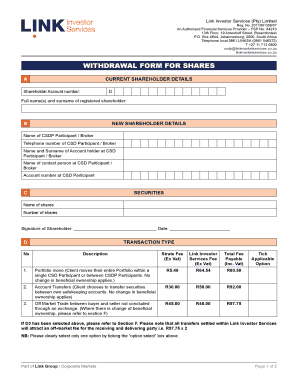
- Click the ‘Get Form’ button to download the withdrawal form and open it in your preferred document editor.
- Begin by filling in your current shareholder details, including your shareholder account number and your full name(s) and surname.
- Next, provide the new shareholder details. This includes the CSDP participant or broker's name, their telephone number, name and surname of the account holder, the contact person's name, and the account number at the CSD participant.
- Proceed to fill in the securities section by writing the name of the shares and the number of shares you wish to withdraw.
- Select the transaction type by ticking the applicable option for either a portfolio move, account transfer, or off-market trade. Ensure that you complete the associated fees information.
- If you selected off-market trade, complete the exemption from Securities Transfer Tax declaration section. Provide the reason for exemption and attach any necessary supporting documents.
- Complete the Securities Transfer Tax payments section if applicable. Ensure to include the correct payment documentation to avoid delays.
- Next, sign the declaration section confirming that you have the capacity to sign and that all information provided is accurate.
- Ensure that your form is fully completed. Missing information may result in rejection. Attach a certified proof of identity document as required.
- Finally, save your changes, and you can choose to download, print, or share the completed form as needed.
Take action now and complete your withdrawal form online to manage your investments seamlessly.
A fee* of $55.00 (GST Inclusive) will apply for each transfer of securities in a listed entity that requires a security validation check. A single fee of $55.00 (GST Inclusive) will be charged if multiple transfers from the same seller (registration details must be an exact match) are received by Link at the same time.