Loading
Get Vat264 Second Hand Goods - Melwescor - Melwescor Co
How it works
-

Open form follow the instructions
-

Easily sign the form with your finger
-

Send filled & signed form or save
How to fill out the VAT264 Second Hand Goods - Melwescor - Melwescor Co online
Filling out the VAT264 form is an essential process for vendors claiming input tax on moveable second-hand or repossessed goods. This guide provides clear steps to assist in completing the form accurately and efficiently, ensuring compliance with tax regulations.
Follow the steps to complete your VAT264 form correctly.
- Click 'Get Form' button to access the VAT264 form and open it in the online editor.
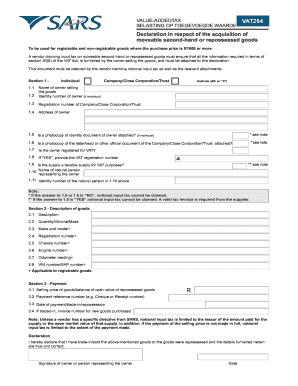
- In Section 1, indicate whether the owner is an individual or a company by placing an ‘X’ in the appropriate box. If the owner is an individual, provide their identity number.
- If the owner is a company or trust, enter the registration number. Follow this by filling in the address of the owner accurately.
- Attach a photocopy of the identity document if the owner is an individual, and a photocopy of an official document or letterhead if a company or trust. Confirm each attachment by answering 'YES' or 'NO' in the provided fields.
- Indicate whether the owner is registered for VAT and, if so, provide the VAT registration number in the designated field.
- Complete the fields regarding the nature of the supply for VAT purposes and provide the name and identity number of the natural person representing the owner if applicable.
- In Section 2, describe the goods being sold, including their quantity, make, model, registration number, chassis number, engine number, odometer reading, and VIN/SAP number as applicable for registrable goods.
- In Section 3, fill in the selling price or the balance of cash value of repossessed goods, along with the payment reference number and the date of payment or trade-in.
- If a trade-in occurred, record the invoice number for the new goods purchased.
- Finally, review the declaration statement, sign it, and enter the date to affirm that all information provided is accurate. Ensure to save the changes and download or print the completed form as needed.
Start completing your VAT264 form online today to ensure your compliance and claim your input tax.
The VAT Act allows a taxpayer to claim an input tax credit where VAT was paid by that taxpayer on goods that where acquired and applied for purposes other than making taxable supplies and that is subsequently applied for the purpose of making taxable supplies.