Loading
Get India Kotak Mahindra Bank Fatca/crs Declaration For Non-individual Accounts 2016-2025
How it works
-

Open form follow the instructions
-

Easily sign the form with your finger
-

Send filled & signed form or save
How to fill out the India Kotak Mahindra Bank FATCA/CRS Declaration For Non-individual Accounts online
The India Kotak Mahindra Bank FATCA/CRS Declaration for Non-individual Accounts is a crucial document designed to ensure compliance with foreign tax regulations. This guide will provide clear, step-by-step instructions on how to accurately complete this form online.
Follow the steps to complete the declaration form accurately
- Click ‘Get Form’ button to obtain the form and open it for completion.
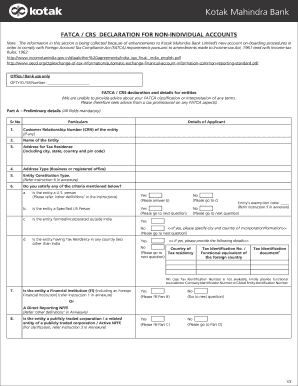
- Begin with Part A, where you will fill in preliminary details. Ensure that all fields are completed accurately. Start with your Customer Relationship Number (CRN) if available, followed by the name of the entity and the address for tax residence, including city, state, country, and pin code.
- Specify the type of address, whether it is for business or registered office, and select the entity constitution type by referring to the provided instruction in the annexure.
- Proceed to question 6 regarding the criteria for classification. Select 'yes' or 'no' in response to whether the entity is a U.S. person, a specified U.S. person, or formed outside India, and fill in additional details where applicable.
- If the entity has tax residency in any country other than India, provide the corresponding tax identification number or equivalent for the foreign country.
- Continue with question 7 to determine if the entity qualifies as a Financial Institution. Depending on your answer, proceed to Part B or to the next relevant section.
- In Part B, if applicable, provide details regarding the Financial Institution or Direct Reporting NFFEs by filling out all relevant information, including the Global Intermediary Identification Number (GIIN).
- If applicable, fill out Part C by answering whether the entity is publicly traded or related to a publicly traded corporation, and provide the required details about the stock exchange.
- In Part D, if the answer to the public trading question is no, indicate whether the entity is a Passive NFFE or an Active NFFE and provide details of all ultimate beneficial owners (UBOs).
- Review all provided information to ensure accuracy, and acknowledge the declaration by signing the document where indicated.
- After filling out all sections, save your changes. You can download, print, or share the form as needed.
Complete your FATCA/CRS declaration online today for a smooth banking experience.
Industry-leading security and compliance
US Legal Forms protects your data by complying with industry-specific security standards.
-
In businnes since 199725+ years providing professional legal documents.
-
Accredited businessGuarantees that a business meets BBB accreditation standards in the US and Canada.
-
Secured by BraintreeValidated Level 1 PCI DSS compliant payment gateway that accepts most major credit and debit card brands from across the globe.