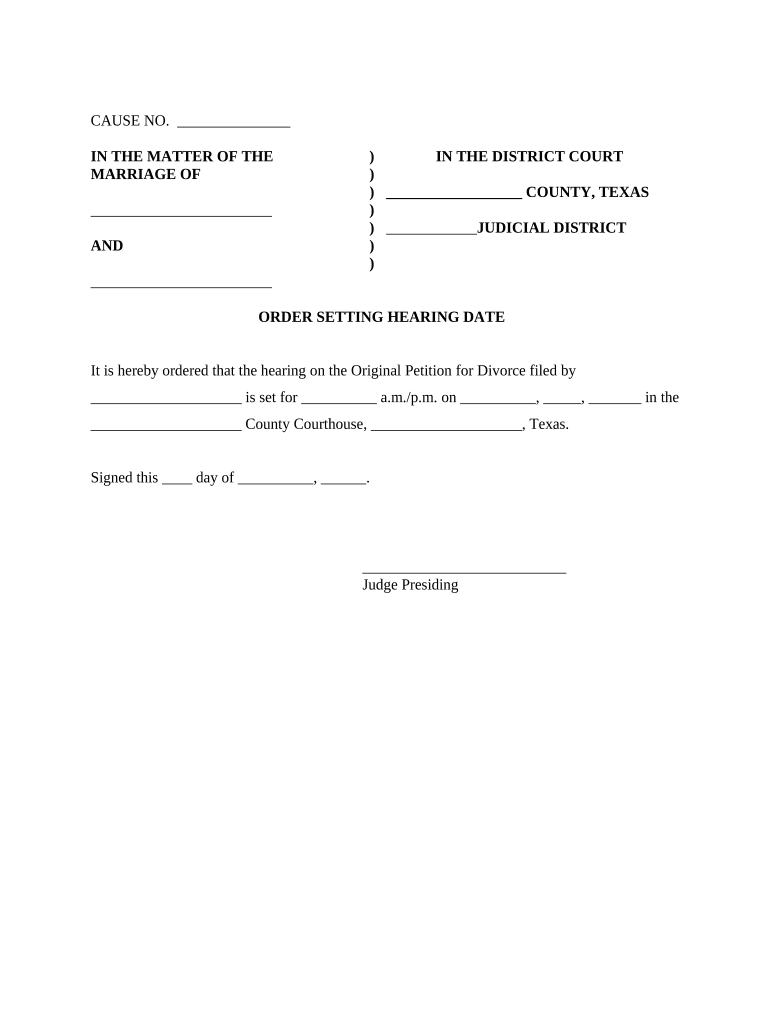
CAUSE NO. IN THE MATTER OF THE) IN THE COURTMARRIAGE OF)) COUNTY, TEXAS )) JUDICIAL DISTRICTAND )) ORDER SETTING HEARING DATEIt is hereby ordered that the hearing on the Original Petition for Divorce.

Open form follow the instructions

Easily sign the form with your finger

Send filled & signed form or save
How to fill out the TX-807D online
This guide provides clear and detailed instructions on how to complete the TX-807D form online. Whether you are familiar with legal documents or approaching them for the first time, this comprehensive resource will help you navigate the process effectively.
Follow the steps to fill out the TX-807D form online.
- Click ‘Get Form’ button to obtain the TX-807D form and open it in your preferred editor.
- Begin by filling in the 'Cause No.' section at the top of the form. This is where you will enter the unique number assigned to your case by the court.
- Next, indicate the names of the individuals involved in the marriage by filling in the blanks under 'In the Matter of the Marriage of'. Ensure to include the legal names as they appear on official documents.
- Proceed to complete the section identifying the court jurisdiction. Fill in the name of the county where the divorce case is filed, followed by the appropriate judicial district number.
- In the 'Order Setting Hearing Date' section, provide the details of the hearing. Fill in the name of the individual who filed the Original Petition for Divorce and the scheduled date and time for the hearing.
- After entering all required information, review the form carefully to ensure all sections are completed accurately. This is crucial to avoid delays in processing.
- Once you have filled out the form and reviewed it, you can choose to save your changes, download the completed form for your records, print it for submission, or share it as needed.
Complete your TX-807D form online today and ensure a smooth filing process.
Experience a faster way to fill out and sign forms on the web. Access the most extensive library of templates available.
Related content
Formation of Business Entities and Nonprofit Corporations Under the Texas ... 807. Payment...
such excess shall be included in gross income under section 803(a)(2). (b) Increase...
Motorola Android Smartphones running on Texas Instruments ... OT-803F, OT-803D, OT-806...
Get answers to your most pressing questions about US Legal Forms API.
How do I write a check to the Texas Secretary of State?
All checks should be made payable to the Secretary of State. Cash should not be sent in the mail. Checks are returned, cash refunded, credit cards and LegalEase® are not charged when used to pay a filing fee for documents that cannot be filed.
How do I pay the Texas Secretary of State?
Payment Methods Credit Card (American Express, Discover, MasterCard, or Visa. Credit card payments are subject to an additional statutory convenience fee of 2.7% of amount charged) Check (personal or business) Money order. Cash. LegalEase® (A deposit account system administered by Frost Bank)
How much is Texas LLC filing fee?
A new LLC that is being formed in Texas needs to file a Certificate of Formation—Limited Liability Company (Form 205) with the Texas Secretary of State, and pay a $300 filing fee. If you need a certified copy of the Certificate of Formation, there is a $30 fee. If you need a Certificate of Status, there is a $5 fee.
What is a Texas SOS CPA filing number?
The Texas SOS File number is the number assigned to an entity registered with the Texas Secretary of State.
How do I contact SOS Texas?
For questions regarding business filings, please contact our Corporations Section at (512) 463-5555 or email corpinfo@sos.texas.gov.
Use professional pre-built templates to fill in and sign documents online faster. Get access to thousands of forms.
If you believe that this page should be taken down, please follow our DMCA take down process here.