Loading
Get Va 10091 2017
How it works
-

Open form follow the instructions
-

Easily sign the form with your finger
-

Send filled & signed form or save
How to fill out the VA 10091 online
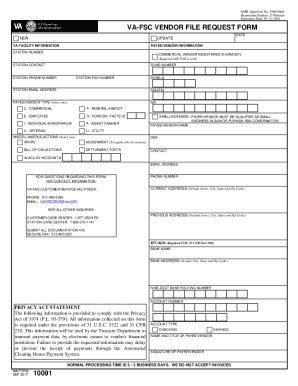
Filling out the VA 10091 form online is a straightforward process designed to streamline vendor registration with the Department of Veterans Affairs. This guide provides clear instructions on each section of the form, ensuring you can complete it accurately and efficiently.
Follow the steps to successfully fill out the VA 10091 form online
- Click ‘Get Form’ button to obtain the form and open it in the editor.
- Indicate if you are a new vendor by checking the 'NEW' box option or if you are updating your information by checking the 'UPDATE' box option.
- Provide the VA station number in the 'Station #' field. This number is essential for identification purposes.
- Enter the name of the station contact in the 'Station Contact Name' field. This should be the name of a VA station employee.
- Fill in the 'Station Phone' number with the direct phone number of the station contact.
- Input the 'Station Fax Number' of the VA station for any necessary correspondence.
- Enter the 'Station Email' address to facilitate communication regarding your application.
- In the 'Payee/Vendor Type' section, select the appropriate type by checking one of the given options.
- If applicable, check the box to confirm you are a commercial vendor registered in SAM.gov, and enter your DUNS number.
- Provide your Social Security Number or Tax Identification Number in the designated field.
- Fill out the 'Vendor Name' field with your legal name as registered with the IRS.
- Complete the 'Current Address' section with your latest address, including city, state, and zip code.
- If applicable, provide your 'Previous Address' for any address changes.
- For financial information, enter your bank name, routing number, and account number in the corresponding fields.
- Finally, sign the form in the designated area and include your name and title.
- Submit the completed form via fax to the provided number for processing.
Start the process of filling out your VA 10091 form online today and ensure your vendor registration is completed without delay.
Get form
Experience a faster way to fill out and sign forms on the web. Access the most extensive library of templates available.
Be able to demonstrate that your firm is responsible. Complete the GSA Pathway to Success education seminar. ... Meet all the requirements of the solicitation. Be able to fulfill all contract obligations outlined in the solicitation.
Get This Form Now!
Use professional pre-built templates to fill in and sign documents online faster. Get access to thousands of forms.