Loading
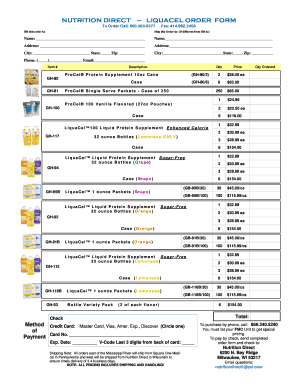
Get Nutrition Direct Liquacel Order Form
How it works
-

Open form follow the instructions
-

Easily sign the form with your finger
-

Send filled & signed form or save
How to fill out the Nutrition Direct Liquacel Order Form online
Filling out the Nutrition Direct Liquacel Order Form online can simplify your ordering process for nutritional supplements. This guide will provide you with clear, step-by-step instructions to help you complete the form accurately and efficiently.
Follow the steps to successfully complete the order form.
- Click ‘Get Form’ button to obtain the order form and open it in your chosen editor.
- In the 'Bill this order to' section, enter the name of the person or organization responsible for the payment. This includes the full name along with the complete address, city, state, and zip code.
- If shipping to a different location, fill in the 'Ship this Order to' section with the recipient's name and address details. Ensure that the city, state, and zip code are provided accurately.
- Enter the phone number and email address of the person making the order for any order updates or queries.
- In the 'Item #' section, review the list of available products. Specify the items you wish to order by indicating the quantity in the 'Qty Ordered' column next to each item.
- Select the payment method by circling your choice—Credit Card or Check. If using a credit card, fill in the card number, expiration date, and the V-Code, which is the last three digits on the back of the card.
- Review your order for accuracy, paying attention to item quantities and payment details.
- Finally, save any changes you've made, and consider downloading, printing, or sharing the filled form as needed.
Complete your documents online today to streamline your ordering experience.
This can be effective for lowering your blood pressure, wound healing and helping your kidneys to remove waste products from your body!