Loading
Get Csp 402 Records Inspection - Colorado.gov
How it works
-

Open form follow the instructions
-

Easily sign the form with your finger
-

Send filled & signed form or save
How to fill out the CSP 402 Records Inspection - Colorado.gov online
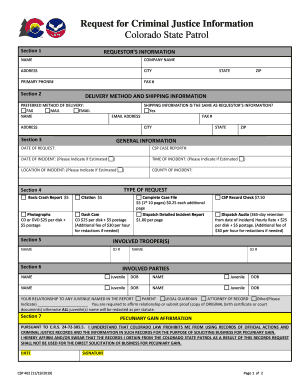
The CSP 402 Records Inspection form is an essential document for individuals seeking access to criminal justice information from the Colorado State Patrol. This guide provides clear, step-by-step instructions for completing the form online, ensuring that users have the necessary information at their fingertips.
Follow the steps to complete the CSP 402 Records Inspection form online:
- Press the ‘Get Form’ button to acquire the CSP 402 form and open it in your chosen form editor.
- Section 1: Fill out the requester’s information. Provide your name, company name (if applicable), address, city, and primary phone number. Optionally, you can include your fax number.
- Section 2: Indicate your preferred delivery method for receiving the records. Choose from fax, mail, or email, and provide any required shipping information. If the shipping information is the same as your requestor information, indicate 'Yes' and continue.
- Section 3: Provide details about the incident. Fill in the CSP case report number, date, time, and location of the incident. If you are unsure about any of these, you can specify that the information is estimated.
- Section 4: Select the type of records you are requesting. Options may include photographs, basic crash reports, citations, and audio recordings. Be aware of any associated fees for each type of record you request.
- Section 5: List the names and ID numbers of any involved troopers. This information is crucial for processing your request.
- Section 6: Fill in the names and dates of birth for any involved parties or juveniles. You must affirm your relationship to any juvenile named in the report, providing necessary documentation if required.
- Section 7: Review and affirm the pecuniary gain affirmation statement. By signing, you affirm that you will not use the obtained records for business solicitation.
- Section 8: If paying by credit card, complete the required information such as card type, card number, expiration date, and billing address. Ensure you sign and date this section to authorize the payment.
- Once all sections are filled out accurately, save your changes, download a copy for your records, and print or share the form as needed.
Complete your CSP 402 Records Inspection form online today for swift processing.
To order photographs you will need to verify the availability by calling 303-239-4180 prior to submitting your request. Any photos deemed to be graphic in nature will not be released without written authorization from an immediate family member.
Industry-leading security and compliance
US Legal Forms protects your data by complying with industry-specific security standards.
-
In businnes since 199725+ years providing professional legal documents.
-
Accredited businessGuarantees that a business meets BBB accreditation standards in the US and Canada.
-
Secured by BraintreeValidated Level 1 PCI DSS compliant payment gateway that accepts most major credit and debit card brands from across the globe.