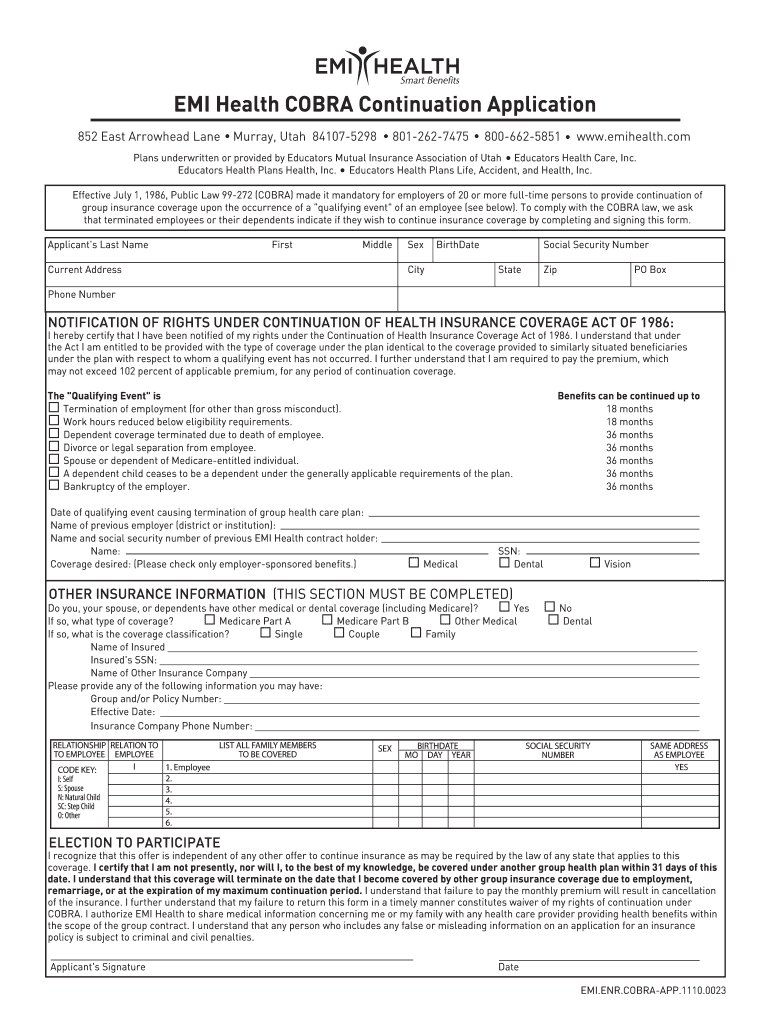
R Policy Number: _________________________________________________________________________________________ Effective Date: ____________________________________________________________________________________________________ Insurance Company Phone Number: ___________________________________________________________________________________ RELATIONSHIP RELATION TO TO EMPLOYEE EMPLOYEE I CODE KEY: I: Self S: Spouse N: Natural Child SC: Step Child O: Other LIST ALL FAMILY MEMBERS TO BE COVERED .
Loading

Open form follow the instructions

Easily sign the form with your finger

Send filled & signed form or save
How to fill out the UT Emi Health Cobra Application Form online
Completing the UT Emi Health Cobra Application Form online is a crucial step for individuals seeking to continue their health insurance coverage after a qualifying event. This guide will provide you with clear, step-by-step instructions to help you fill out the form correctly and efficiently, ensuring you understand each part of the application process.
Follow the steps to fill out the application form with ease.
- Click ‘Get Form’ button to obtain the form and open it in the editor.
- Begin by entering your personal information in the required fields. Fill in your last name, first name, and middle name where indicated. Select your sex and enter your birth date.
- Provide your social security number and current address, including the city, state, zip code, and if applicable, PO Box information.
- Input your phone number, ensuring that you have provided a number where you can be contacted.
- Carefully read the notification of rights under the Continuation of Health Insurance Coverage Act of 1986. Acknowledge your understanding by certifying that you have been informed of your rights.
- Identify the qualifying event that applies to you. Check the relevant box that best describes your situation, such as termination of employment or reduction of work hours.
- Enter the date of the qualifying event and provide the name of your previous employer.
- List the name and social security number of your previous EMI Health contract holder.
- Indicate the coverage you desire by checking the appropriate boxes for medical, dental, or vision benefits.
- Complete the other insurance information section honestly and accurately. Indicate whether you or your dependents have other medical or dental coverage and provide details if applicable.
- List all family members to be covered, including their sex, birthdate, and social security number. Indicate if they share the same address as you.
- Read and acknowledge the election to participate. Ensure that you understand the implications of coverage and your responsibilities regarding payment.
- Finally, sign and date the application form to validate your submission.
- After completing the form, save your changes, download the form for your records, print it out, or share it as needed.
Complete your application online today to ensure your health coverage continuity.
Experience a faster way to fill out and sign forms on the web. Access the most extensive library of templates available.
Related content
OTHER INSURANCE: EMI Health. 852 E Arrowhead, Murray, UT ... • You will have to fill out...
ENROLLMENT APPLICATION (Complete entire application.) Utah State University Eastern...
Mar 1, 1978 — subscription, use the application form bound in the magazine or write for...
Get answers to your most pressing questions about US Legal Forms API.
Can you fill out COBRA online?
Yes, you can often fill out the UT Emi Health Cobra Application Form online, depending on the tools offered by your employer. This option provides convenience and immediate submission, which can expedite the processing of your COBRA application. Check with your employer or health plan for the online resources available to you.
Can I elect COBRA coverage online?
Many employers offer the option to elect COBRA coverage online, allowing for a seamless experience. To do this, you may need to access an online portal provided by your employer or health plan administrator. Within the portal, you can fill out the UT Emi Health Cobra Application Form and submit your election electronically, simplifying the process.
How quickly can you enroll in COBRA?
You can typically enroll in COBRA coverage within 60 days of your qualifying event. This period allows you to carefully review your options and ensure that you complete the UT Emi Health Cobra Application Form accurately. Timely enrollment is crucial to avoid any gaps in your health coverage, so make sure to act promptly.
How do I apply for COBRA coverage?
To apply for COBRA coverage, you must complete the UT Emi Health Cobra Application Form. Start by reviewing your eligibility for COBRA benefits, then gather necessary information such as employment details and qualifying events. Once you have all the required documents, you can submit the form through your employer or the relevant health plan administrator.
What is COBRA and how does it work?
COBRA, or the Consolidated Omnibus Budget Reconciliation Act, allows you to keep your health insurance coverage for a limited time after losing your job or experiencing other qualifying events. It works by requiring employers to offer continued coverage, typically for up to 18 months. By filling out the UT Emi Health Cobra Application Form, you can secure your benefits without disruption to your healthcare services.
What is COBRA forms?
COBRA forms are official documents required to apply for COBRA health insurance benefits. These include the UT Emi Health Cobra Application Form, which captures essential information about your employment status and health coverage needs. Filling out these forms accurately ensures a smoother transition and helps you maintain health benefits during periods of change.
What is the purpose of a COBRA?
The purpose of COBRA is to provide temporary health insurance coverage for individuals and their families after certain qualifying events, such as job loss or reduction in hours. This law allows you to maintain your group health benefits under your previous employer's plan. Understanding the COBRA coverage process, including the UT Emi Health Cobra Application Form, is crucial for ensuring you receive the benefits you need during transitions.
How do you elect a COBRA?
Electing COBRA requires you to submit the UT Emi Health Cobra Application Form within the specified election period provided by your employer. This form must include the necessary details about your coverage choices, so be sure to follow the instructions meticulously. If you need assistance, tools available on US Legal Forms can guide you through this process smoothly.
Where can I get COBRA paperwork?
You can obtain your COBRA paperwork, including the UT Emi Health Cobra Application Form, through your employer or health plan administrator. If your employer does not provide these forms directly, you can access them online through platforms like US Legal Forms. These resources simplify the process and ensure you have all the necessary documentation to proceed.
Do you automatically enroll in COBRA?
You are not automatically enrolled in COBRA; you must elect to continue your coverage within a specified time frame after a qualifying event, typically 60 days. It's crucial to respond promptly to avoid any lapses in coverage. Utilizing the UT Emi Health Cobra Application Form can help simplify the enrollment process.
Use professional pre-built templates to fill in and sign documents online faster. Get access to thousands of forms.
If you believe that this page should be taken down, please follow our DMCA take down process here.