Loading
Get Document B Narrative Budget Template And Detail Budget Template - Cdss Ca
How it works
-

Open form follow the instructions
-

Easily sign the form with your finger
-

Send filled & signed form or save
How to use or fill out the Document B Narrative Budget Template And Detail Budget Template - Cdss Ca online
Completing the Document B Narrative Budget Template and Detail Budget Template is essential for submitting a budget proposal to the California Department of Social Services. This guide provides a step-by-step approach to filling out these templates online, ensuring clarity and thoroughness in your submissions.
Follow the steps to complete the budget templates easily.
- Click ‘Get Form’ button to access the templates and open them in the editor.
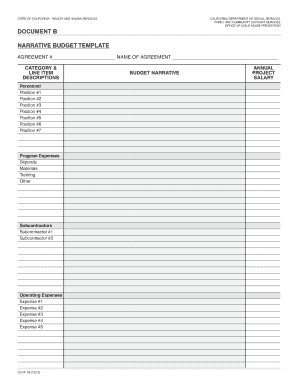
- Begin filling out the 'Agreement #' and 'Name of Agreement' fields at the top of the form to identify your submission clearly.
- In the 'Category & Line Item Descriptions' section, provide detailed descriptions for each budget category, including salary, program expenses, stipends, materials, and other relevant items. This clarification is crucial for the review process.
- For personnel information, list each position under 'Annual Project Salary.' Include the salaries for each position, ensuring that you specify the percentage of time each individual will dedicate to the project.
- Fill in the program expenses by detailing costs for stipends, materials, training, and any additional expenses. Be comprehensive to support your budgetary requests.
- If applicable, detail subcontractor expenses under the 'Subcontractors' section. Ensure that all expected costs related to subcontractors are included for transparency.
- Complete the operating expenses section by listing all necessary expenditures such as utilities or office supplies. Be as specific as possible for accurate budgeting.
- Input any indirect costs that may apply, typically calculated as a percentage of the total budget. This should also be included in the grand totals section for final calculation.
- Review all fields to ensure accuracy and completeness. It may be helpful to have a colleague assist with the review for clarity.
- Once all sections are completed, save your changes. You will have the option to download, print, or share the final version of your completed budget templates.
Get started on completing your budget documents online today.
The Key Components of a Budget Learn about net income, fixed expenses, variable expenses, and discretionary expenses and examples of each.