Loading
Form preview
  • US Legal Forms
  • Other Templates
  • More Forms
  • More Multi-State Forms
  • Jharkhand State Open School, Ranchi - Jsos.ac.in

Get Jharkhand State Open School, Ranchi - Jsos.ac.in

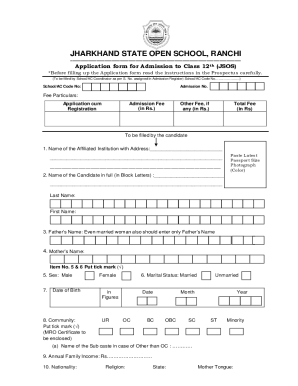
JHARKHAND STATE OPEN SCHOOL, RANCHI Application form for Admission to Class 12th (JSOS)*Before filling up the Application form read the instructions in the Prospectus carefully. (To be filled by School/AC.

How it works

  1. Open form

    Open form follow the instructions

  2. Easily sign form

    Easily sign the form with your finger

  3. Share form

    Send filled & signed form or save

How to fill out the JHARKHAND STATE OPEN SCHOOL, RANCHI - Jsos.ac.in online

Filling out the application form for admission to class 12th at Jharkhand State Open School requires attention to detail and understanding of the required information. This guide aims to assist users with a clear, step-by-step process to complete the online form efficiently.

Follow the steps to successfully fill out your application form.

  1. Click ‘Get Form’ button to acquire the application form and open it in the appropriate online editor.
  2. Carefully read the instructions provided in the prospectus before proceeding to fill out the form. Ensure you have all necessary documents ready.
  3. Fill in the affiliated institution's name and address in the designated section. Make sure it is clearly written.
  4. Enter your full name in block letters, ensuring to separate your last name from your first name as indicated.
  5. Provide your father's name and your mother's name as required in the form.
  6. Indicate your sex by marking the appropriate option.
  7. Fill in your date of birth in the given format: day, month, year.
  8. Select your community by ticking the corresponding box and ensure to enclose your MRO certificate if applicable.
  9. Declare your marital status, marking either married or unmarried as required.
  10. Indicate your annual family income in the specified field.
  11. Provide information regarding your nationality, religion, state, and mother tongue.
  12. If applicable, indicate if you are a person with a disability by ticking the appropriate box and enclose the necessary certificate.
  13. List your identification marks clearly in the designated space.
  14. Detail your previous educational qualifications, including any certificates for classes passed.
  15. If you have previously studied and failed in class 12 of another board, provide the relevant details in the table format provided.
  16. Select the subjects you want to study in class 12 from the options available and enter the corresponding codes.
  17. Specify your medium of instruction in the designated section.
  18. Provide your present and permanent postal addresses, ensuring accuracy for correspondence.
  19. Enter your mobile number for communication.
  20. Review your application carefully, affirming the truthfulness of your provided information. Both the candidate and coordinator must sign where required.
  21. After completing the form, save your changes. You may have the options to download, print, or share the filled application form as necessary.

Complete your admission application form online now to ensure a smooth process.

Get form

Experience a faster way to fill out and sign forms on the web. Access the most extensive library of templates available.
Get form

Related content

Best Top Private Amity University Ranchi in...
Amity university in Ranchi is among the best private university in India, The university...
Learn more

Related links form

Construction Or Non-Construction Investments Expires 10/31/2026 Gopher Tortoise Permit Refund Request Form 2022 CBP 1300 2024

Questions & Answers

Get answers to your most pressing questions about US Legal Forms API.

Contact support

Yes, Jharkhand State Open School is recognized by the government, and the degree is accepted by the MHROD, Government of India.

Yes ,NIOS or jharkhand open school or any other open school ,all are eligible to apply for NEET .

SHIKSHA BHAWAN, BEHIND TAGORE HILL, MORABADI, RANCHI, JHARKHAND PIN CODE - 834008.

JSOS takes their examination twice a year and a candidate get nine chances to clear the exam. AFter completion of the exam this board provides acertificate to their students . This certification is equivalent to the other certificate of other boards and university. So JSOS is eligiblile for government job.

yes, the institution was formed with an aim to provide education as a distance learning programme for those who cannot attend school. it is recognised under the government of Jharkhand and the degree is accepted by the MHROD, Government of India. Don't worry.

How to open school in Jharkhand?? Step 1- Visit to https://rte.jharkhand.gov.in/ . Step 2- On the right side you will see “Registration” in Menu. Step 3- You will get 2 Options “School Registration” and “Student Registration”. Step 4- Click on “School Registration”. Step 5- Fill the registration form.

Get This Form Now!

Use professional pre-built templates to fill in and sign documents online faster. Get access to thousands of forms.
Get form
If you believe that this page should be taken down, please follow our DMCA take down processhere.
Get JHARKHAND STATE OPEN SCHOOL, RANCHI - Jsos.ac.in
Get form
  • Adoption
  • Bankruptcy
  • Contractors
  • Divorce
  • Home Sales
  • Employment
  • Identity Theft
  • Incorporation
  • Landlord Tenant
  • Living Trust
  • Name Change
  • Personal Planning
  • Small Business
  • Wills & Estates
  • Packages A-Z
  • Affidavits
  • Bankruptcy
  • Bill of Sale
  • Corporate - LLC
  • Divorce
  • Employment
  • Identity Theft
  • Internet Technology
  • Landlord Tenant
  • Living Wills
  • Name Change
  • Power of Attorney
  • Real Estate
  • Small Estates
  • Wills
  • All Forms
  • Forms A-Z
  • Other Templates
  • Legal Hub
  • About Us
  • Help Portal
  • Legal Resources
  • Blog
  • Affiliates
  • Contact Us
  • Delete My Account
  • Site Map
  • Industries
  • Forms in Spanish
  • Localized Forms
  • State-specific Forms
  • Forms Kit
  • Real Estate Handbook
  • All Guides
  • Notarize
  • Incorporation services
  • For Consumers
  • For Small Business
  • For Attorneys
  • USLegal
  • FormsPass
  • pdfFiller
  • signNow
  • altaFlow
  • DocHub
  • Instapage
Form Packages
  • Adoption
  • Bankruptcy
  • Contractors
  • Divorce
  • Home Sales
  • Employment
  • Identity Theft
  • Incorporation
  • Landlord Tenant
  • Living Trust
  • Name Change
  • Personal Planning
  • Small Business
  • Wills & Estates
  • Packages A-Z
Form Categories
  • Affidavits
  • Bankruptcy
  • Bill of Sale
  • Corporate - LLC
  • Divorce
  • Employment
  • Identity Theft
  • Internet Technology
  • Landlord Tenant
  • Living Wills
  • Name Change
  • Power of Attorney
  • Real Estate
  • Small Estates
  • Wills
  • All Forms
  • Forms A-Z
  • Other Templates
Customer Service
  • Legal Hub
  • About Us
  • Help Portal
  • Legal Resources
  • Blog
  • Affiliates
  • Contact Us
  • Delete My Account
  • Site Map
  • Industries
  • Forms in Spanish
  • Localized Forms
  • State-specific Forms
  • Forms Kit
Legal Guides
  • Real Estate Handbook
  • All Guides
Prepared for you
  • Notarize
  • Incorporation services
Our Customers
  • For Consumers
  • For Small Business
  • For Attorneys
Our Sites
  • USLegal
  • FormsPass
  • pdfFiller
  • signNow
  • altaFlow
  • DocHub
  • Instapage
Social Media
Call us now toll free:
+1 833 426 79 33
As seen in:
© Copyright 1999-2026 airSlate Legal Forms, Inc. 17 Station Street, Ste. 203, Brookline, MA 02445
  • Your Privacy Choices
  • Terms of Service
  • Privacy Notice
  • Content Takedown Policy
  • Bug Bounty Program