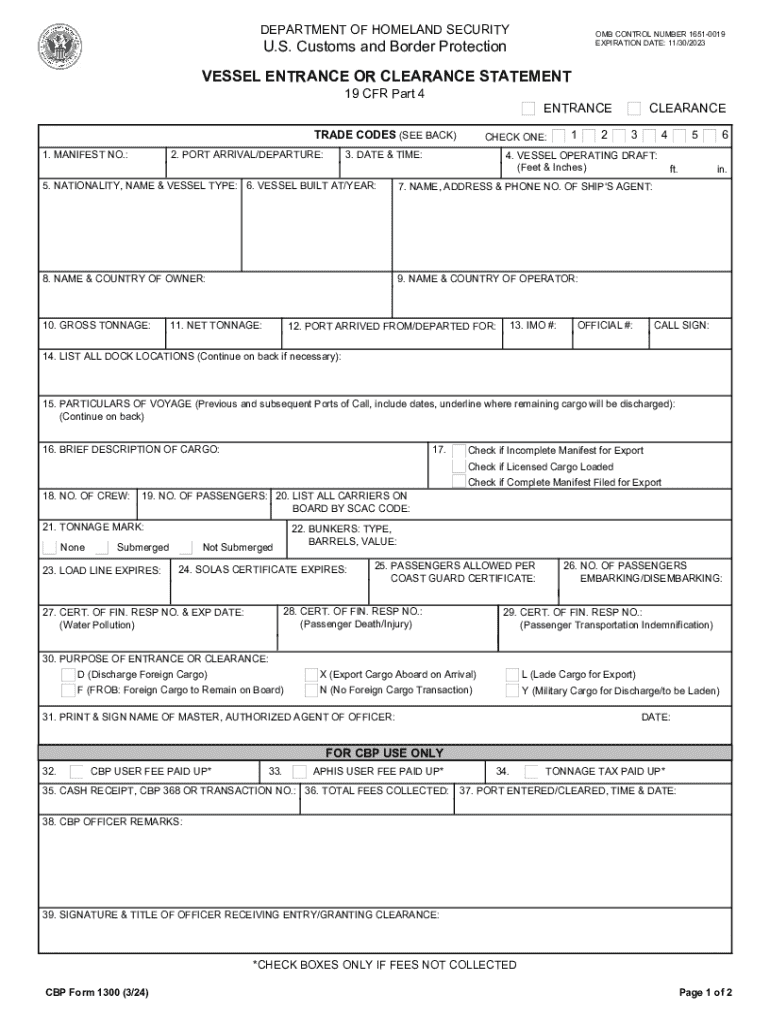
ODES (SEE BACK) 1. MANIFEST NO.: 2. PORT ARRIVAL/DEPARTURE: CHECK ONE: 3. DATE & TIME: 1 2 CLEARANCE 3 4 4. VESSEL OPERATING DRAFT: (Feet & Inches) 5. NATIONALITY, NAME & VESSEL TYPE: 6. VESSEL BUILT AT/YEAR: 7. NAME, ADDRESS & PHONE NO. OF SHIP'S AGENT: 8. NAME & COUNTRY OF OWNER: 9. NAME & COUNTRY OF OPERATOR: 10. GROSS TONNAGE: 11. NET TONNAGE: 12. PORT ARRIVED FROM/DEPARTED FOR: 13. IMO #: OFFICIAL #: 5 ft. 6 in. CALL SIGN: 14. LIST ALL DOCK LOCATIONS (Continue on back i.
Loading

Open form follow the instructions

Easily sign the form with your finger

Send filled & signed form or save
How to fill out the CBP 1300 online
The CBP 1300 form is essential for reporting the entrance or clearance of a vessel in U.S. waters. This guide provides clear, step-by-step instructions to help users accurately complete the form online, ensuring compliance with U.S. Customs and Border Protection regulations.
Follow the steps to complete the CBP 1300 form online.
- Press the ‘Get Form’ button to access the CBP 1300 and open it in your preferred online editor.
- In the first field, enter the manifest number assigned to your vessel.
- Specify the port of arrival or departure in the corresponding section.
- Select the date and time of the vessel's entrance or clearance from the dropdown calendar.
- Input the vessel's operating draft in feet and inches; ensure accurate measurement.
- Provide the nationality, name, and type of the vessel in the appropriate fields.
- Indicate where the vessel was built and its year of construction.
- Enter the name, address, and phone number of the ship's agent representing the vessel.
- Fill in the name and country of the owner of the vessel.
- Specify the name and country of the operator managing the vessel.
- List the gross tonnage of the vessel.
- Indicate the net tonnage of the vessel.
- State the port from which the vessel arrived or to which it is departing.
- Input the International Maritime Organization (IMO) number, if applicable.
- Provide the official number of the vessel.
- List all dock locations where the vessel is scheduled to dock.
- Detail particulars of the voyage, including previous and upcoming ports of call.
- Write a brief description of the cargo being transported.
- Check the appropriate boxes for incomplete manifests or licensed cargo loaded, if necessary.
- Record the number of crew members onboard.
- Indicate the number of passengers onboard.
- List all carriers onboard by their Standard Carrier Alpha Code (SCAC).
- Check the tonnage mark status: none, not submerged, or submerged.
- Provide the expiration date of the load line.
- Record the type and value of bunkers onboard.
- Indicate the expiration date of the SOLAS certificate.
- Specify the number of passengers allowed per Coast Guard certificate.
- Document the number of passengers embarking and disembarking.
- Provide the purpose of entrance or clearance, selecting from the available options.
- Print and sign the name of the master, authorized agent, or officer responsible.
- Enter the date of signing.
- Check the boxes for any fees that were not collected if applicable.
- Once all sections are completed, make sure to save your changes, download, print, or share the completed CBP 1300 form as required.
Complete your CBP 1300 form online today for a smooth vessel clearance process.
Experience a faster way to fill out and sign forms on the web. Access the most extensive library of templates available.
Related content
Form 1300 - Vessel Entrance or Clearance Statement. Document Posting Date: January 19...
A clearance application for a vessel intending to depart for a foreign port must be made...
The Air National Guard (ANG), also known as the Air Guard, is a federal military reserve...
Use professional pre-built templates to fill in and sign documents online faster. Get access to thousands of forms.
If you believe that this page should be taken down, please follow our DMCA take down process here.