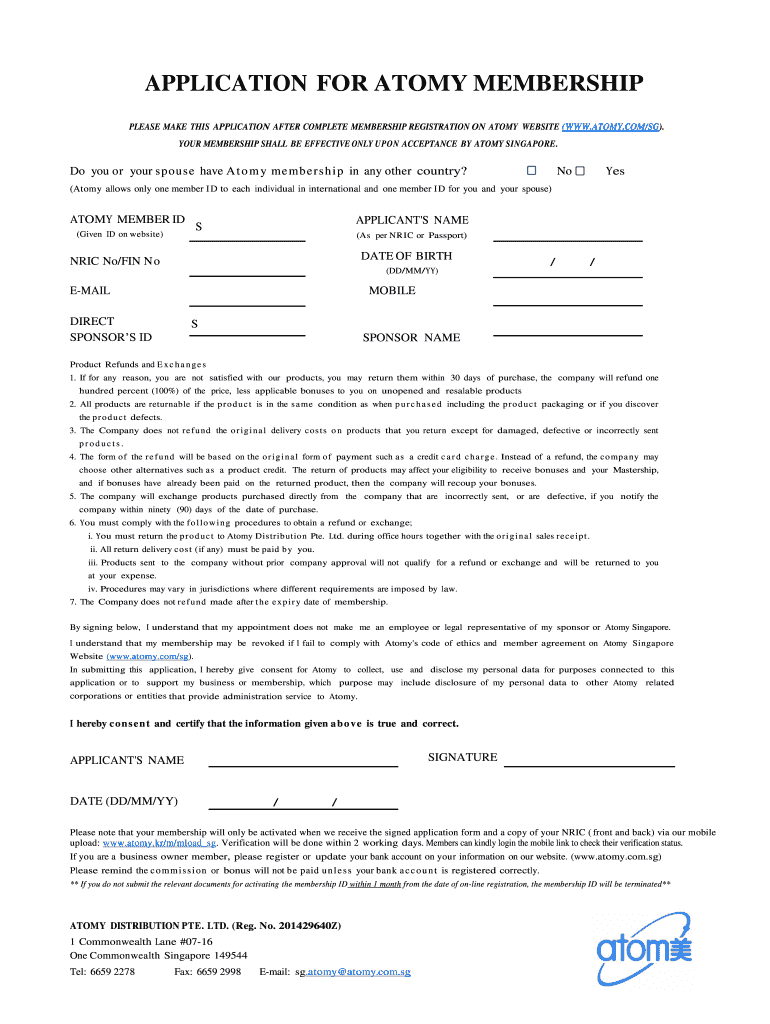
APPLICATION FOR ATOMY MEMBERSHIP PLEASE MAKE THIS APPLICATION AFTER COMPLETE MEMBERSHIP REGISTRATION ON ATOMY WEBSITE (WWW.ATOMY.COM/SG). YOUR MEMBERSHIP SHALL BE EFFECTIVE ONLY UPON ACCEPTANCE BY.
Loading

Open form follow the instructions

Easily sign the form with your finger

Send filled & signed form or save
How to fill out the SG Application For Atomy Membership online
Completing the SG Application For Atomy Membership online is a straightforward process. This guide will provide you with clear steps to ensure your application is filled out accurately and efficiently.
Follow the steps to successfully complete your Atomy membership application.
- Press the ‘Get Form’ button to obtain the application form and access it for completion.
- Indicate whether you or your partner have an Atomy membership in any other country by selecting 'Yes' or 'No.' Remember, Atomy allows only one membership ID per individual internationally.
- Enter your Atomy Member ID if applicable.
- Provide your full name as per your NRIC or passport.
- Input your date of birth in the format DD/MM/YY.
- Fill in your NRIC No or FIN No.
- Enter your primary email address.
- Provide your mobile phone number.
- Enter your direct sponsor’s ID, followed by the sponsor's name.
- Read and acknowledge the product refunds and exchanges policy, ensuring understanding of return procedures and conditions.
- Sign the application field confirming that the information provided is accurate.
- Date the application in the format DD/MM/YY.
- Remember to upload a copy of your NRIC (front and back) via the specified mobile upload link to activate your membership.
- Save your changes, download, print, or share the completed form as needed.
Complete your SG Application For Atomy Membership online today to start your journey!
Experience a faster way to fill out and sign forms on the web. Access the most extensive library of templates available.
Related content
by A Azzouna · 2003 · Cited by 15 — These clear localizations of CHH- and VIH-antigens...
7, Fr, Ra, Ac, Rf, Db, Sg, Bh, Hs, Mt, Ds, Rg, Uub, —, Uuq, —, —, —, —. 6, Ce...
Ruthenium is a chemical element with the symbol Ru and atomic number 44. ... A minor...
Get answers to your most pressing questions about US Legal Forms API.
Will Atomy membership expire?
Upon purchase, 12 months will be valid from the month following the month of the last purchase to the last day of the 12th month. However, the validity period of a new member expires from the last day of the 6th month if there is no purchase record for 6 months after first registration of Atomy member.
How do you become an Atomy member?
To be a Member at Atomy, you need to log-in to the Atomy website, agree to company policies, and fill out the Membership Registration page. Once you receive a Membership Number you are a qualified Member.
How do I join Atomy Singapore?
To be a new member of Atomy, you need to log-in to Atomy Singapore website (.atomy.com/sg), agree to company policies, fill out the registration form. Once you receive an email from us with ID number, you are a qualified member.
How do I quit Atomy?
Atomy agrees that a Member may terminate its Membership and this Agreement for any reason by providing a letter of Membership termination to Atomy by email at: atomyau_cs@atomypark.com or as otherwise specified by Atomy from time to time. Membership termination will be deemed accepted at the time of receipt by Atomy.
Is there a joining fee for Atomy?
There is no cost or risk to join Atomy There is nothing to lose and so much to gain by trying Atomy products: Free to Join. No Registration Fees.
How to apply for Atomy membership?
To be a Member at Atomy, you need to log-in to the Atomy website, agree to company policies, and fill out the Membership Registration page. Once you receive a Membership Number you are a qualified Member.
What is the benefit of Atomy membership?
Benefits of Atomy membership Savings on high quality products. Money back guarantee within 30 days of purchase. Your membership number is valid worldwide. Loyalty points that can be converted into commission and revenus.
Use professional pre-built templates to fill in and sign documents online faster. Get access to thousands of forms.
If you believe that this page should be taken down, please follow our DMCA take down process here.