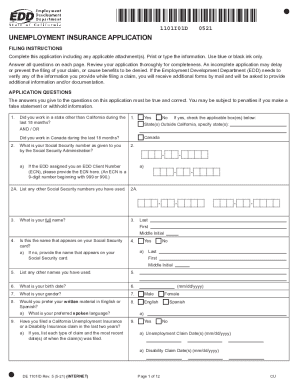
1101I01D1114UNEMPLOYMENT INSURANCE APPLICATION FILING INSTRUCTIONS Complete this application including any applicable attachment(s). Print or type the information. Use blue or black ink only. Answer.
Loading
Open form follow the instructions
Easily sign the form with your finger
Send filled & signed form or save
How to fill out the CA DE 1101ID online
Filling out the CA DE 1101ID form online is an essential step for those seeking unemployment insurance benefits in California. This guide provides clear, step-by-step instructions to help users complete the form accurately and efficiently.
Follow the steps to fill out the CA DE 1101ID online successfully.
- Click ‘Get Form’ button to obtain the form and open it in the editor.
- Begin by entering your Social Security number as provided by the Social Security Administration. If applicable, include your EDD Client Number as well.
- Fill out your full name as it appears on your Social Security card. Ensure any variations or previous names are also listed.
- Provide details regarding your employment history over the past 18 months. This includes the names and addresses of all employers, the period you worked for them, total wages earned, and payment frequency.
- Indicate if you have worked for any educational institutions or are currently self-employed, supplying necessary details about your most recent employment.
- Answer questions regarding your availability for work, any received payments, and your citizenship or immigration status when prompted.
- Review all information entered for accuracy and completeness, as errors can delay your application.
- Once all sections are completed, save your changes. You can download the form, print it, or share it as needed.
Complete the CA DE 1101ID online today to ensure you get the benefits you deserve.
Experience a faster way to fill out and sign forms on the web. Access the most extensive library of templates available.
Related content
Have you filed a California Unemployment Insurance or a Disability Insurance claim in the...
California claim until the benefit year of the claim ends. ... Wages, DE 23A, provide the...
Get answers to your most pressing questions about US Legal Forms API.
How do I fix my EDD disqualification?
If you are disqualified from receiving benefits, you have the right to appeal within 30 days of the mailing date on your Notice of Determination. Visit Unemployment Insurance Appeals for more information on the process.
Can you print EDD forms online?
Downloading and Printing The forms are in Portable Document Format (PDF). You may need to download the no-cost Adobe Reader to view and print linked documents.
Is California forgiving EDD overpayment?
If we determine the potential overpayment was not your fault or was not due to fraud, you may qualify for an overpayment waiver. We will send you a Personal Financial Statement (DE 1446) with the Notice of Potential Overpayment.
Where can I get my EDD disability form?
You can get a paper Claim for Disability Insurance (DI) Benefits (DE 2501) form by: Ordering a form onlineto have it mailed to you. Getting the form from your licensed health professional or employer. Visiting an SDI Office. Calling 1-800-480-3287 and selecting DI Information option 3 to request a paper form by mail.
Does CA EDD send text messages?
To better serve our customers, the EDD offers an SMS text notification option for people to receive updates about their unemployment insurance claim. With this service, you'll receive a text alert when: Your claim is processed in our systems. Your first benefit payment is issued on your claim.
What form does my doctor have to fill out for disability EDD?
For Disability Insurance claims, fill out and sign Part B – Physician/Practitioner's Certificate on the Claim for Disability Insurance (DI) Benefits (DE 2501) form. Mail it in within 49 days from the date your patient's disability begins.
How do I download documents to EDD?
Recommended: Log in to your UI Online account and go to the Upload Income Documents for PUA section on the homepage to provide the required documents. If you prefer to mail your documents, write your 10-digit EDD Customer Account Number (EDDCAN) clearly at the top of each page.
Can I download EDD forms?
To complete forms, you may need to download and save them on the computer, then open them with the no-cost Adobe Reader. To search and order brochures and forms from the EDD, visit Online Forms and Publications. All are available at no cost, whether you download or order for delivery by mail.
Use professional pre-built templates to fill in and sign documents online faster. Get access to thousands of forms.
If you believe that this page should be taken down, please follow our DMCA take down process here.