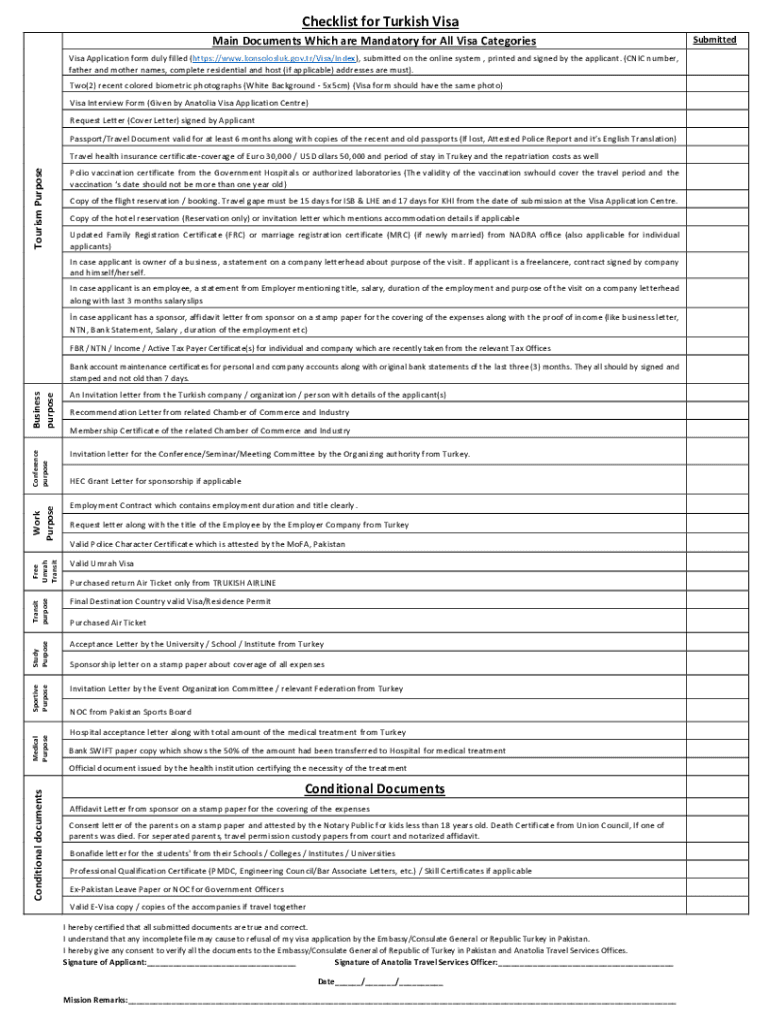
Checklist for Turkish Visa Main Documents Which are Mandatory for All Visa Categories Visa Application form duly filled (https://www.konsolosluk.gov.tr/Visa/Index), submitted on the online system.
Loading

Open form follow the instructions

Easily sign the form with your finger

Send filled & signed form or save
How to fill out the Anatolia Travel Services online
This guide provides step-by-step instructions for filling out the Anatolia Travel Services visa application form online. Whether you are applying for travel, business, or another purpose, this guide will support you in navigating the necessary components of the form.
Follow the steps to complete your application effectively.
- Click ‘Get Form’ button to obtain the application form and open it for editing.
- Carefully fill in personal details such as your name, CNIC number, and residential address. Ensure that the information matches your identification documents.
- Provide the names of your father and mother as required in the designated fields.
- Upload two recent colored biometric photographs that meet the specifications (white background, 5x5cm) and ensure they match the photo on the visa form.
- Complete the Visa Interview Form provided by the Anatolia Visa Application Centre. Be truthful and thorough in your responses.
- Draft and attach a request letter or cover letter, signed by you, explaining the purpose of your visit.
- Ensure your passport or travel document is valid for at least six months. Include copies of recent and old passports, if applicable.
- Provide a travel health insurance certificate covering the required amount and duration of your stay.
- Include a polio vaccination certificate, ensuring it meets the specified validity requirements.
- Add copies of flight and hotel reservations or invitation letters outlining accommodation details.
- If applicable, attach detailed financial documentation showing business ownership or sponsorship information.
- Review all entries for accuracy and completeness before submitting.
- Once all information is entered and verified, save any changes. You can download, print, or share the completed form as needed.
Submit your completed documents online to ensure your visa application is processed efficiently.
Experience a faster way to fill out and sign forms on the web. Access the most extensive library of templates available.
Related content
Reconsider travel to Turkey due to COVID-19. Exercise increased caution when traveling to...
... unsuccessfully for a guide to India for several months, he decided to continue his...
Prearranged visa obtained online through travel agencies available at Hanoi, Ho Chi Minh...
Get answers to your most pressing questions about US Legal Forms API.
How do I check my visa status for Turkey?
Turkey visa check status online head over to the official website of the E-Visa application system of the Republic of Turkey. input your reference code provided in your visa application summary email. ... input your passport number. input your e-mail address. input the captcha. click 'submit'
How do I prove sufficient funds for Turkish visa?
To prove that you have sufficient financial means, you can submit any of the following: Last three months' bank statement. Proof of income, such as salary slips or amount from renting.
What is the minimum bank balance for Turkish visa?
Bank statement reflecting transactions of last 6 months, with bank seal and sign on last page and with minimum balance of 1 lakh rupees per applicant. Salary slip for last three months with company seal.
Which website is best for Turkey visa?
.evisa.gov.tr is a government portal run by the Ministry of Foreign Affairs of Türkiye. e-Visa applications can be created for an individual, for a family (minimum of 2 and maximum of 10 people) or for a group (minimum of 10 and maximum of 300 people). e-Visa is valid for touristic and trade purposes only.
Is Turkey visa easy to get?
Apply for Turkey eVisa Online with Yatra.com The visa for Turkey is a short-term visa valid for a period of 30 days granted to Indians travelling for the purposes of tourism or business. This visa is very easy to procure as the procedure is an online one provided you have all the documentation in place.
What documents are required for Turkish visa?
Your passport, visa application form and a letter from your employer are the necessary documents for your application. Other documents should be submitted to the Turkish Ministry of Labour and Social Security (MLSS) by your employer within ten working days after your application.
How much bank balance is required for Turkish visa?
How Much Bank Balance Is Required For A Turkish visa? You need to provide bank statements for the last six months. In addition, you need to show that you have at least $ 50 per day.
What documents are required for Turkey visa?
Your passport, visa application form and a letter from your employer are the necessary documents for your application. Other documents should be submitted to the Turkish Ministry of Labour and Social Security (MLSS) by your employer within ten working days after your application.
Use professional pre-built templates to fill in and sign documents online faster. Get access to thousands of forms.
If you believe that this page should be taken down, please follow our DMCA take down process here.