Loading
Get Ca Mc-601 1990-2026
How it works
-

Open form follow the instructions
-

Easily sign the form with your finger
-

Send filled & signed form or save
How to fill out the CA MC-601 online
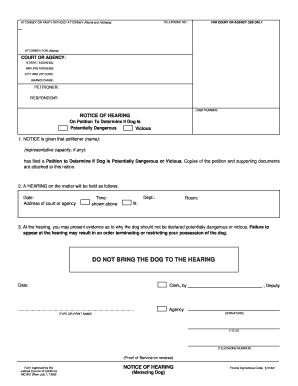
The CA MC-601 form is used to initiate a hearing regarding a petition to determine if a dog is potentially dangerous or vicious. This guide will provide you with detailed, step-by-step instructions on how to accurately complete the form online.
Follow the steps to successfully complete the CA MC-601 form.
- Press the ‘Get Form’ button to access the CA MC-601 form and open it in an online editor.
- Begin by entering the telephone number of the petitioner in the designated field. This should be a reliable phone number where you can be reached.
- In the section labeled 'Attorney or party without attorney,' provide the name and address of the individual filing the petition. If you are represented by an attorney, include their details here.
- Fill in the 'For court or agency use only' section as required, leaving sufficient space for court officials to complete the additional information pertinent to your case.
- Next, indicate the name of the attorney representing the petitioner, if applicable, by completing the 'Attorney for (Name)' field.
- Complete the address details for the court or agency. This includes the street address, mailing address, city, and zip code. Ensure accuracy, as this information is crucial for court notifications.
- In the case number field, input the number assigned to your case, if available. This helps track your submission within the legal system.
- For the notice of hearing section, provide the name of the petitioner and any representative capacity if applicable, alongside the date, time, and address where the hearing will take place.
- Fill out information regarding the potential dangerous or vicious dog as per requirements, ensuring that all relevant information is included.
- After completing the form, review all entries for accuracy and ensure that there are no missing fields. Once satisfied, you can save your changes.
- Finally, choose to download, print, or share your completed form according to your needs, and remember to press the 'Clear This Form' button for privacy and protection.
Complete your documents online now for a smoother processing experience.