Loading
Get Children's Medical Report Form - Klingspor
How it works
-

Open form follow the instructions
-

Easily sign the form with your finger
-

Send filled & signed form or save
How to fill out the Children's Medical Report Form - Klingspor online
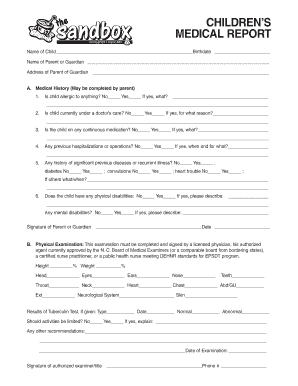
Completing the Children's Medical Report Form - Klingspor online is a straightforward process that allows parents and guardians to provide essential health information about their child. This guide offers clear, step-by-step instructions for filling out the necessary sections of the form to ensure accurate reporting.
Follow the steps to complete the form effectively.
- Press the ‘Get Form’ button to access the form and open it for editing.
- Begin by entering the child's details at the top of the form: Include the name of the child and their birthdate.
- Fill out the parent or guardian's name in the provided section.
- Provide the address of the parent or guardian clearly.
- Section A, Medical History, asks several questions: Answer whether the child has any allergies. If yes, specify what they are.
- Indicate if the child is currently under a doctor's care, and if so, explain the reason.
- State whether the child is taking any continuous medications, providing details if applicable.
- Note any previous hospitalizations or surgeries, specifying when they occurred and for what reasons.
- Report any significant previous diseases or recurring illnesses. Indicate if the child has diabetes, convulsions, heart trouble, or others as needed.
- Indicate if the child has any physical or mental disabilities, providing further explanation where necessary.
- Remember to sign and date the form in the section for the parent's or guardian's signature.
- For Section B, Physical Examination, ensure a licensed examiner completes the required parts, including height, weight, and examination results.
- Gather and enter the results of any Tuberculin test, if applicable, including the date and type of test.
- Confirm whether any activities should be limited and provide details if needed.
- The authorized examiner needs to sign and date this section, including their title and phone number.
- Finally, for the Immunization History, record the date for each immunization received or attach the immunization record, noting specific state requirements.
- Once all sections are complete, save the changes to the form. You can then proceed to download, print, or share the document as needed.
Complete the Children's Medical Report Form - Klingspor online today to ensure your child's health information is accurately documented.