Loading
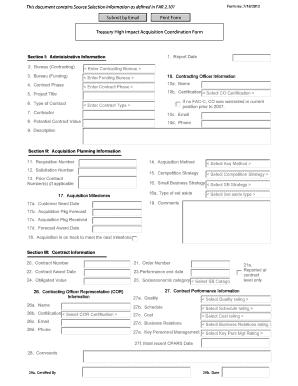
Get Treasury High Impact Acquisition Coordination Form This Document ... - Treasury
How it works
-

Open form follow the instructions
-

Easily sign the form with your finger
-

Send filled & signed form or save
How to use or fill out the Treasury High Impact Acquisition Coordination Form This Document ... - Treasury online
This guide provides an expert overview on how to accurately fill out the Treasury High Impact Acquisition Coordination Form. By following these clear steps, users can ensure they complete the document effectively to meet acquisition requirements.
Follow the steps to successfully complete the Treasury High Impact Acquisition Coordination Form.
- Press the ‘Get Form’ button to obtain the form and open it for editing.
- In Box 1, enter the date of the HIA report.
- In Box 2, select the Bureau that is awarding or administering the contract.
- In Box 3, select the Bureau that is requesting the contract action.
- In Box 4, choose the Contract Phase relevant to the acquisition.
- In Box 5, provide a brief title for the acquisition, project, or contract.
- In Box 6, select the predominant type of contract.
- In Box 7, enter the name of the contractor performing the contract.
- In Box 8, input the potential value of the contract, including all options.
- In Box 9, provide a brief description of the acquisition or contract action.
- In Box 10, enter the name, certification level, email, and phone number of the Contracting Officer.
- In Box 11, enter the requisition or purchase request number.
- In Box 12, input the solicitation number.
- In Box 13, enter any prior contracts related to the products or services.
- In Box 14, select the FAR procedures applicable to the contract action.
- In Box 15, choose the competition strategy to be employed.
- In Box 16, select the Small Business strategy to be utilized.
- In Box 17, list forecast and actual acquisition milestones.
- In Box 18, confirm if the acquisition is on track to meet upcoming milestones.
- In Box 19, enter any relevant comments about the acquisition planning.
- In Box 20, provide the numerical designator for the contract.
- In Box 21, enter the order number if applicable.
- In Box 22, select the date the contract was awarded.
- In Box 23, indicate the performance end date.
- In Box 24, enter the total obligated value of the contract as of the report date.
- In Box 25, select the socioeconomic category applicable to the contractor.
- In Box 26, enter the COTR's name, certification level, email, and phone number.
- In Box 27, select the contractor’s current performance rating in various areas.
- In Box 28, add any comments regarding contractor performance.
- In Box 29, enter the name and certification date of the individual verifying information.
- Once completed, save changes, then opt to download, print, or share the form as needed.
Complete your Treasury High Impact Acquisition Coordination Form online today!
Over the past eleven weeks, Treasury has sent out nearly 83 million checks for more than $35 billion in tax relief. Treasury will continue to send out checks as extensions or late-filed returns are processed.
Industry-leading security and compliance
US Legal Forms protects your data by complying with industry-specific security standards.
-
In businnes since 199725+ years providing professional legal documents.
-
Accredited businessGuarantees that a business meets BBB accreditation standards in the US and Canada.
-
Secured by BraintreeValidated Level 1 PCI DSS compliant payment gateway that accepts most major credit and debit card brands from across the globe.