Loading
Get Foothills Neurology, P.c. New Patient Registration
How it works
-

Open form follow the instructions
-

Easily sign the form with your finger
-

Send filled & signed form or save
How to fill out the Foothills Neurology, P.C. New Patient Registration online
Filling out the New Patient Registration form for Foothills Neurology, P.C. is an essential step in receiving timely and effective care. This guide will help you navigate each section of the form with clear instructions, ensuring that you provide the necessary information accurately and efficiently.
Follow the steps to complete your registration form easily.
- Click ‘Get Form’ button to obtain the form and open it in the editor.
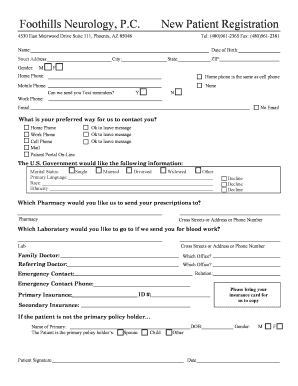
- Start by entering your full name in the designated field. This is typically the first section and may be labeled simply as 'Name.'
- Input your date of birth in the required format. This should be placed in the 'Date of Birth' field to help verify your identity.
- Fill out your complete street address as requested, including any apartment number if applicable. Ensure accuracy for correspondence.
- Indicate your gender by selecting the appropriate option provided: Male, Female, or another option if available.
- Provide your current city, state, and ZIP code to ensure the clinic can contact you as needed.
- Enter your home phone number. If your home phone is the same as your cell phone, check the corresponding box. Otherwise, complete the mobile phone field.
- You can specify your work phone number if applicable. Optionally, indicate whether you would like to receive text reminders by selecting Yes or No.
- List your email address in the appropriate field. If you do not have an email address, indicate this by selecting 'No Email.'
- Select your preferred contact method. You may choose options such as Home Phone, Work Phone, Cell Phone, Mail, or Patient Portal Online.
- Complete the demographic questions concerning marital status, primary language, race, and ethnicity. You can opt to decline to answer these questions if you choose.
- Specify your preferred pharmacy by providing the name, street address, or phone number where prescriptions should be sent.
- Indicate your choice of laboratory for blood work by providing the name and address or phone number.
- Provide details about your family doctor, including their name and which office they are associated with.
- Mention the referring doctor if you were referred and indicate their office information.
- Provide emergency contact details, including the name, relationship to you, and a phone number where they can be reached.
- Prepare to bring your insurance card during your appointment for copying and fill in your insurance details.
- If you are not the primary policy holder of the insurance, include the primary holder's name and your relationship to them.
- Sign and date the form at the bottom. This signature indicates your understanding of the financial responsibility outlined in the form.
- Upon completing the form, check all fields for accuracy. You can then save your changes, download the completed form, print it, or share it as needed.
Complete your New Patient Registration online to facilitate your upcoming visit.