Loading
Get Fl Permit Application - Marion County 2017-2026
How it works
-

Open form follow the instructions
-

Easily sign the form with your finger
-

Send filled & signed form or save
How to fill out the FL Permit Application - Marion County online
This guide provides a comprehensive roadmap for completing the FL Permit Application for Marion County online. Whether you are a homeowner or a contractor, following these steps will ensure that your application is filled out accurately and efficiently.
Follow the steps to successfully complete your application.
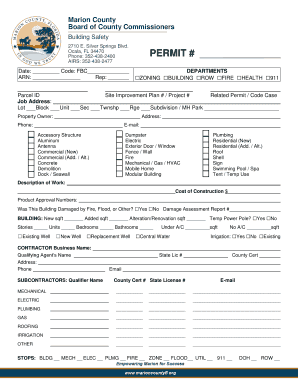
- Press the ‘Get Form’ button to acquire the FL Permit Application. This will allow you to open the form in an online editor.
- Begin filling out the permit application by entering the date and code in the specified fields. Make sure to provide accurate information as this will be used for processing your application.
- Fill in your ARN (Application Reference Number) and representative details if applicable.
- Indicate the permit number and select the relevant departments involved in your application by checking the appropriate boxes.
- Enter the Parcel ID and fill out the site improvement plan number or project number if available.
- Complete the job address section. Provide details like lot number, block, unit, section, township, range, and the name of the subdivision or mobile home park.
- Input the property owner's name, address, and phone number. This information is essential for records and communication.
- Select the category of work being performed, such as residential or commercial, by marking the relevant checkboxes.
- Clearly describe the work to be carried out and provide the estimated cost of construction.
- Fill in any product approval numbers if applicable, and indicate whether the building has been damaged by fire, flood, or other events.
- For building specifics, enter the square footage for new construction, any additions, and alteration or renovation details.
- Complete the contractor details, including the business name, qualifying agent's name, and contact information.
- If applicable, list subcontractors and provide their qualification details.
- Include information pertaining to mechanical, electrical, plumbing, gas, irrigation, and roofing work, entering contractor names and relevant quantities.
- Review the application thoroughly to ensure all fields are completed with accurate information.
- Once you have filled out all sections, choose to save changes, download, print, or share your completed form as needed.
Complete your FL Permit Application online today for a smoother approval process.